
Applications
An application in the Intelligent Application Manager is a combination of a project version, a server and a database that will appear as a standalone application in the user interfaces. A project version can therefore result in several applications on different servers and/or for different databases. Each application has its own authorization and user preferences.
Roles are distinct tasks or activities within an application. They are often named after the corresponding activity, like Approve hours or Report a ticket.
Applications and roles are created by the application administrator. The application manager is responsible for granting users access to those applications, by creating users and user groups and assigning roles for specific applications to those user groups.
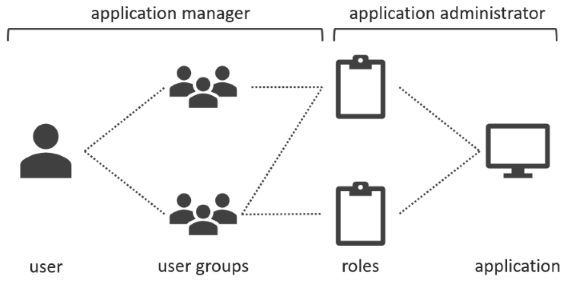 Authorization overview
Authorization
User groups are linked to roles on the Authorization tab page of the Applications screen. Checkboxes next to the user group indicate if any roles are assigned to the user group.
To grant a user group access to the application, select a user group from the list and then check the roles to which this user group needs access on the right of the screen.
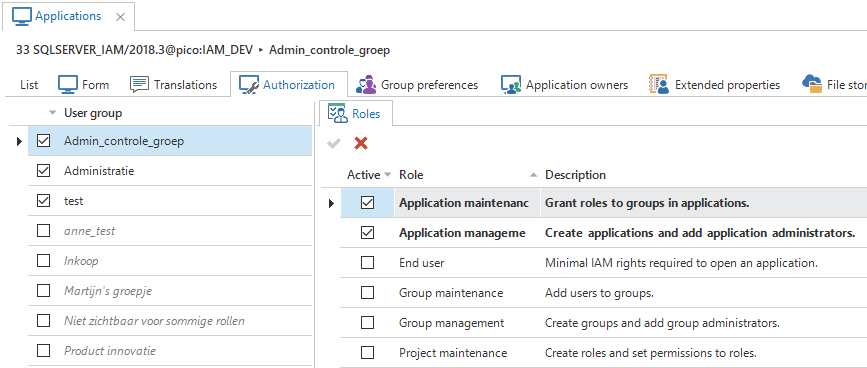 Linking roles to user groups
Apply rights
Tasks are available to apply the required rights to the databases:
| Task | |
|---|---|
 Apply user rights Apply user rights | Creates the users and user groups on the application database |
 Apply user rights to IAM Apply user rights to IAM | Creates the users on the IAM database |
To be able to apply the rights to an SQL Server database, an application manager who is not a database system administrator needs additional database rights. This can be done using the following code snippet:
use [iam_database]
go

grant alter any user to [login_name]
go

use [application_database]
go

grant alter any user to [login_name]
go

use master
go

grant alter any login to [login_name]
go