
Thinkwise Platform Overview
This document gives a high-level overview of the Thinkwise Platform, comprising the Software Factory development environment, the Intelligent Application Manager and the various adaptive user interfaces.
Introduction
The Thinkwise Platform is an integrated software development environment to develop new software applications and modernize existing applications. These applications consist of a database, business logic, user interfaces and, if necessary, data interfaces to other applications.
Applications developed within this environment are easily kept up-to-date both technologically and functionally. The productivity of the development process amounts to 0.5 hours per func-tion point where currently the market average for traditional software development is 8 to 10 hours per function point and the market average for other low-code platforms is approximately 2.5 hours per function point (see 6.3).
The Thinkwise Platform consists of the three following components:
- Software Factory (SF)
- Intelligent Application Manager (IAM)
- Abstract Graphical User Interfaces (GUIs)
The Software Factory is used during the development and test phase to develop an application on the basis of a model (blueprint). The graphical user interfaces interpret the model during runtime so that the user can work directly with the application. Once the development is completed, the model is transferred to the Intelligent Application Manager in the production environment.
The Intelligent Application Manager manages all the models of applications that are in the acceptance and production phases. The application managers can also set up authorizations using IAM. The presentation for the user is again provided by the GUIs. End users can set up their own user preferences via the GUIs and get suggestions from IAM to optimize their user experience.
The GUIs are available under Windows, Web and Mobile (smartphone and tablet). Theyuarn capabilities of the various GUIs are very extensive and as good as identical, to the extent that this is technologically possible.
The modernization of software applications takes place with the Thinkwise Upcycler. This tool is only deployed by Thinkwise itself and is not described in this document.
The positioning of the various Thinkwise products (Upcycler, SF, IAM and GUIs) is presented in the diagram below. Each product is discussed separately in the following chapters with the exception of the Upcycler.
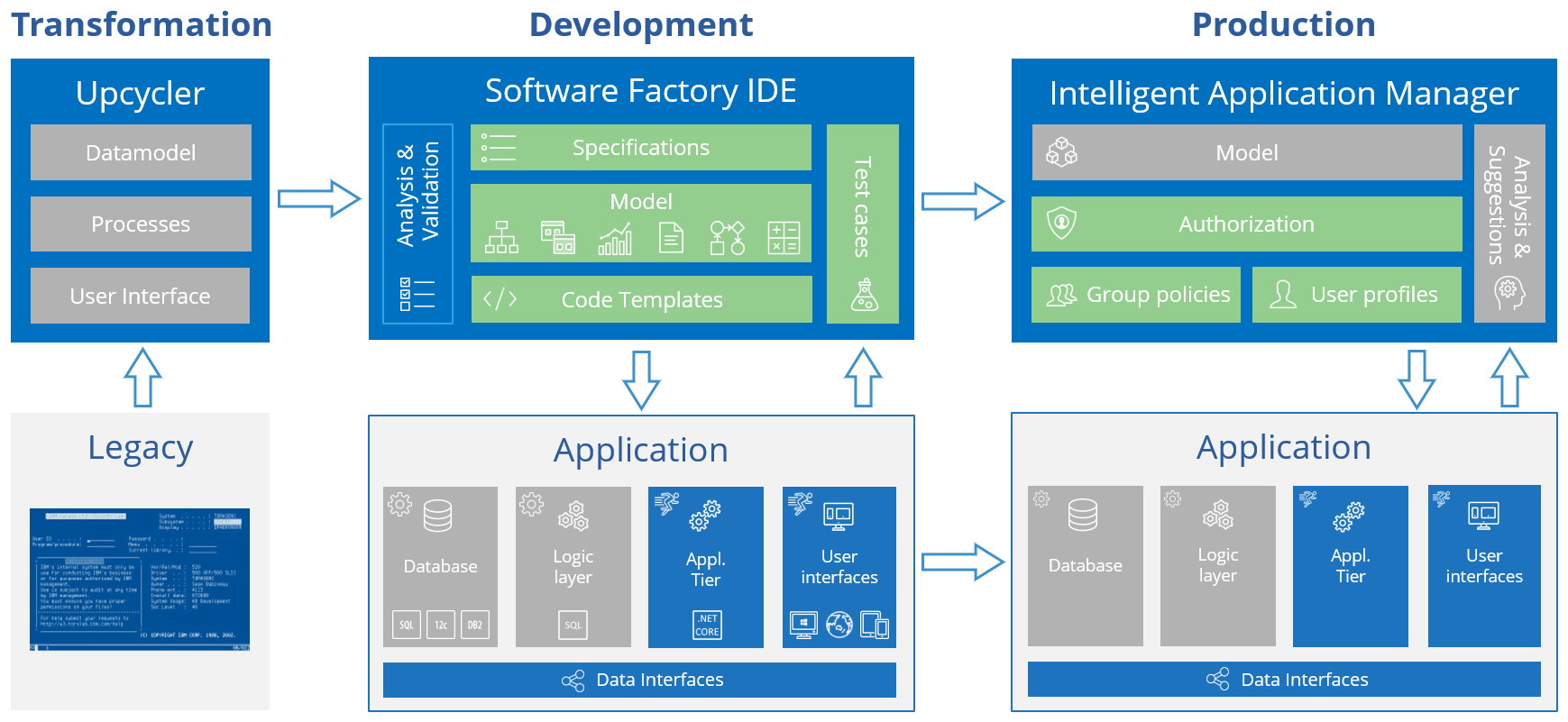 Thinkwise Platform overview
Individual manuals are available for the SF, IAM and GUIs. The requirements for their installation are described in the online documentation. An example of a Legacy application that can be modernized to a Windows, Web and/or Mobile application using the Thinkwise Platform is given below:
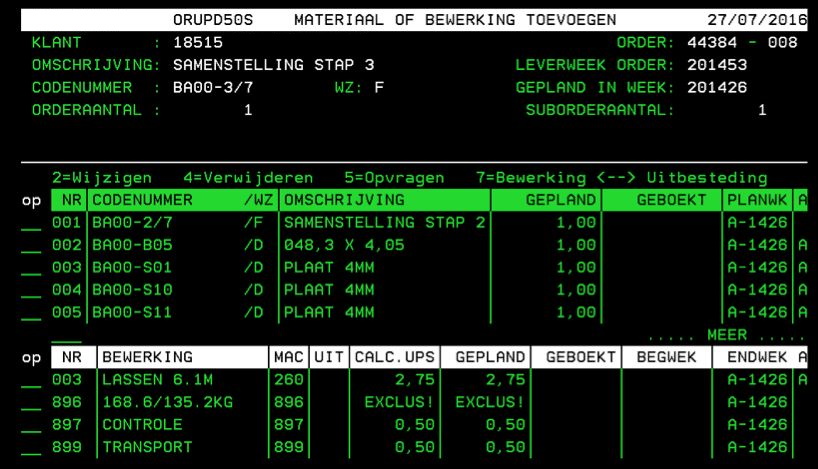 Example of a legacy application
Subsequently the modernized screen in a Windows environment:
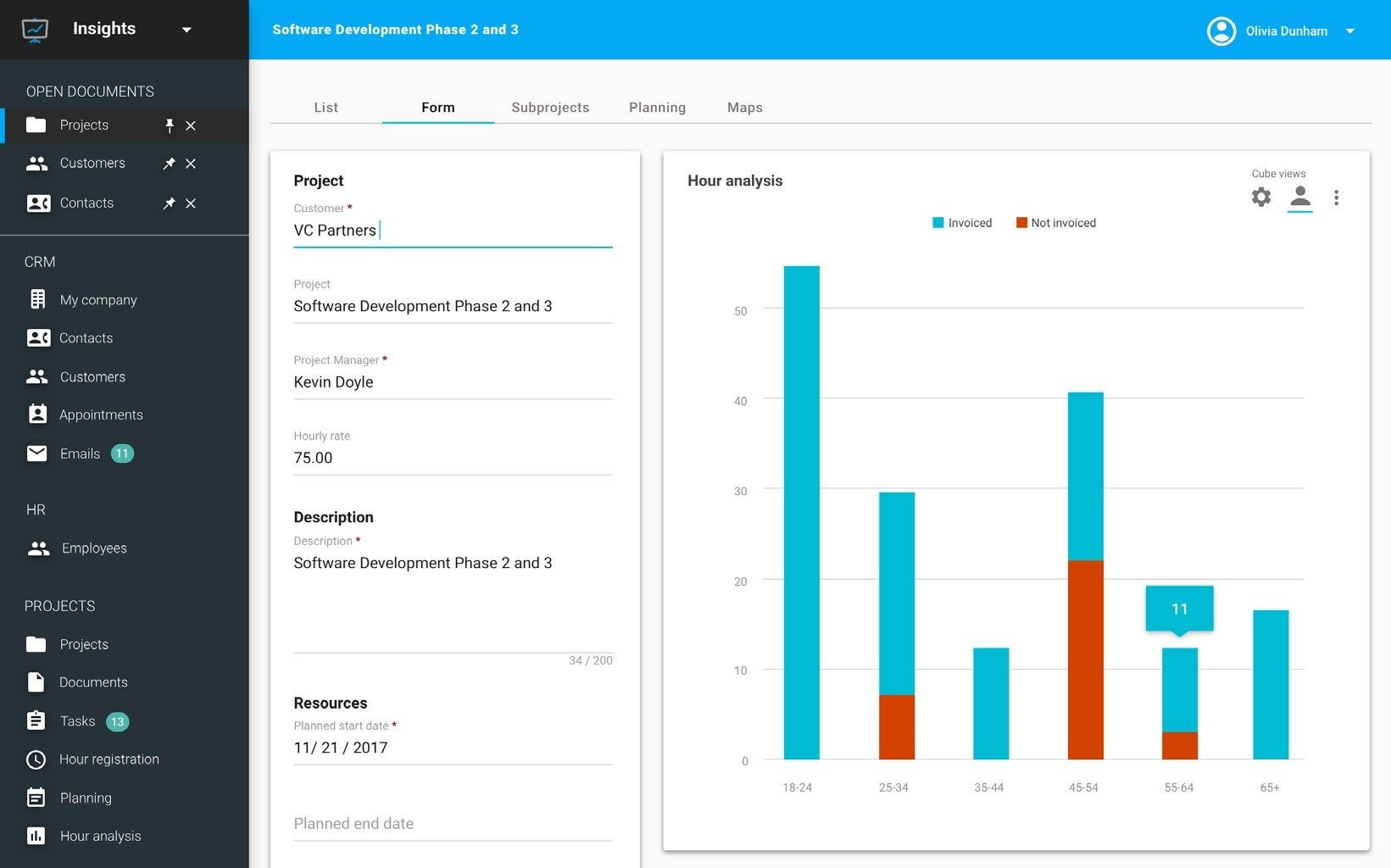 Example of a modernized application
Architecture
Thinkwise applications consist of a data tier, an application tier and a presentation tier (GUIs). The business logic, which contains customer-specific functionality, can be included in the data tier (in the form of SQL procedures, functions and triggers) but also in the application tier, using .NET or Java code. Depending on this choice the functionality is developed in SQL, C# or Java.
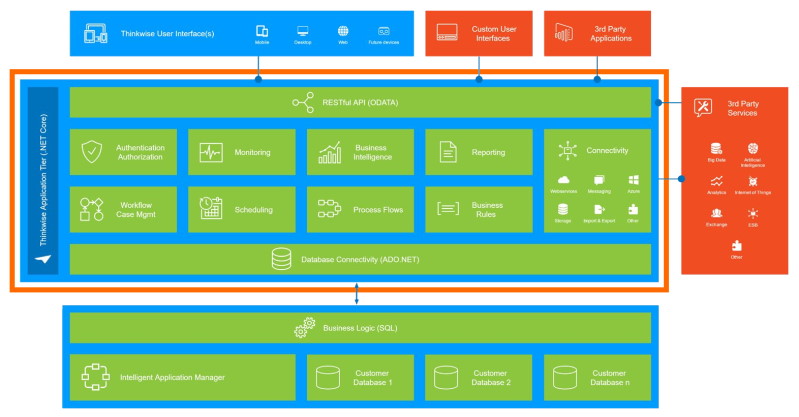 Thinkwise Platform Architecture
Connectivity
The Thinkwise Application Tier is the central integration hub of the Thinkwise Platform and provides a solution for all integration challenges. With automated processes and a range of default connectors, the Thinkwise Platform can connect to third party services and applications, like:
- Artificial Intelligence services (Bots, Virtual Assistants, Machine Learning, Image recognition)
- Big Data solutions (Search, Analytics, Internet of Things)
- Office integration (Exchange, Office 365, SharePoint)
- Third party applications (custom user interfaces, financial applications)
Third party applications and services in turn can connect to Thinkwise applications with minimal effort using the provided webhooks and REST API. The Thinkwise Application Tier uses the OData protocol for its API, one of the most widely used standards for RESTful web services.
Here are a few examples:
Exchange
An application can synchronize appointments, tasks, e-mails and contacts with Exchange.
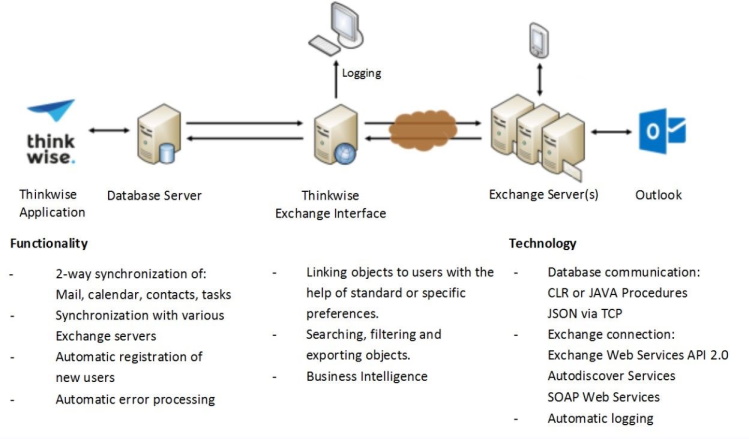 Architecture of the Exchange connector
Incoming and outgoing e-mails can be enriched in the application so that the exchange with a customer or supplier is fully and quickly transparent.
Appointments and tasks can be made in the application, then dealt with in Outlook (via Exchange) whereupon the new status is passed on to the application.
Business Intelligence can then be applied to e-mails, appointments and tasks.
Web services
SOAP and JSON/REST services can be called, for instance, to retrieve distances, postal codes and CoC details. Furthermore, it is also possible to make services available that can be called by other applications.
Maps
The GUIs can visualize geographic data such as locations and routes on maps from various providers, such as Google Maps, MapQuest and Here Maps.
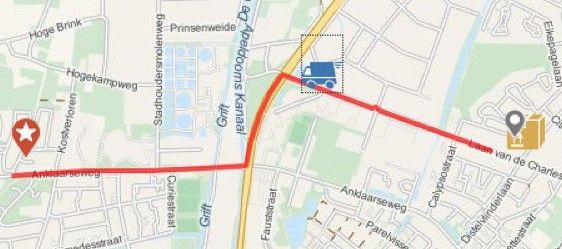 Example of maps integration
Security
The Thinkwise Platform is designed with security in mind, following the Security by Design principles. It provides controls to protect the confidentiality and integrity of information and to ensure the availability to authorized users. The Thinkwise Platform supports different authentication protocols, like OpenID and SAML, Single Sign-on and multi-factor authentication.
The Thinkwise Intelligent Application Manager provides Role-based access control and entity-, row- and field-level authorization, while the Application Tier ensures that business rules are respected at all times, even when importing data or when interfacing with third party applications.
Scalability
The Thinkwise Platform is optimized for speed and scalability. The stateless Application Tier can easily be horizontally scaled for load balancing and failover purposes. This allows optimal use of the power of cloud platforms, such as Microsoft Azure, Amazon Web Services, Google Cloud or IBM Cloud.
The Application Tier is developed with the .Net Core framework, making it cross platform and highly optimized for running in (Docker) containers.
Software Factory
The process of development with the SF consists of the following phases:
- Analysis
- Modeling & Validating
- Development & Testing
This is presented in the figure below:
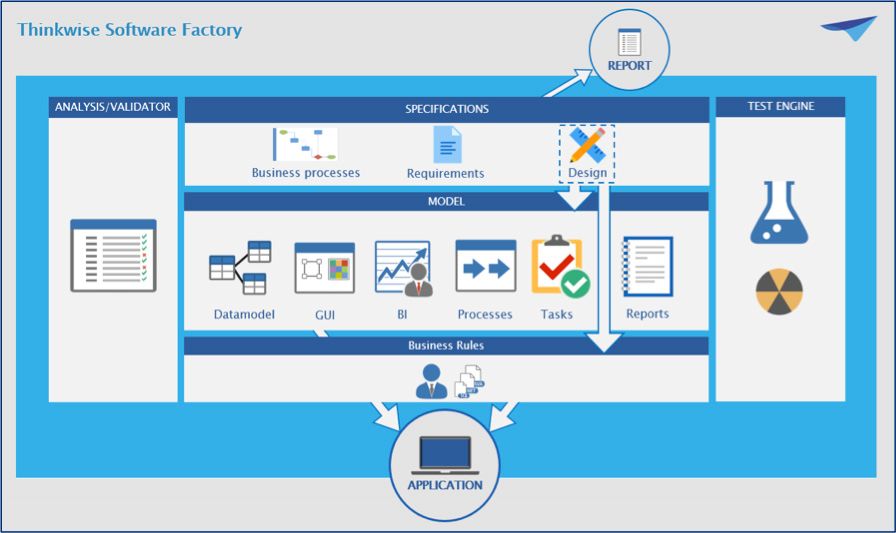 Development in three phases
These three phases appear again in the user interface of the SF. The development team has access to the components of these phases via the menu on the left-hand side of the screen.
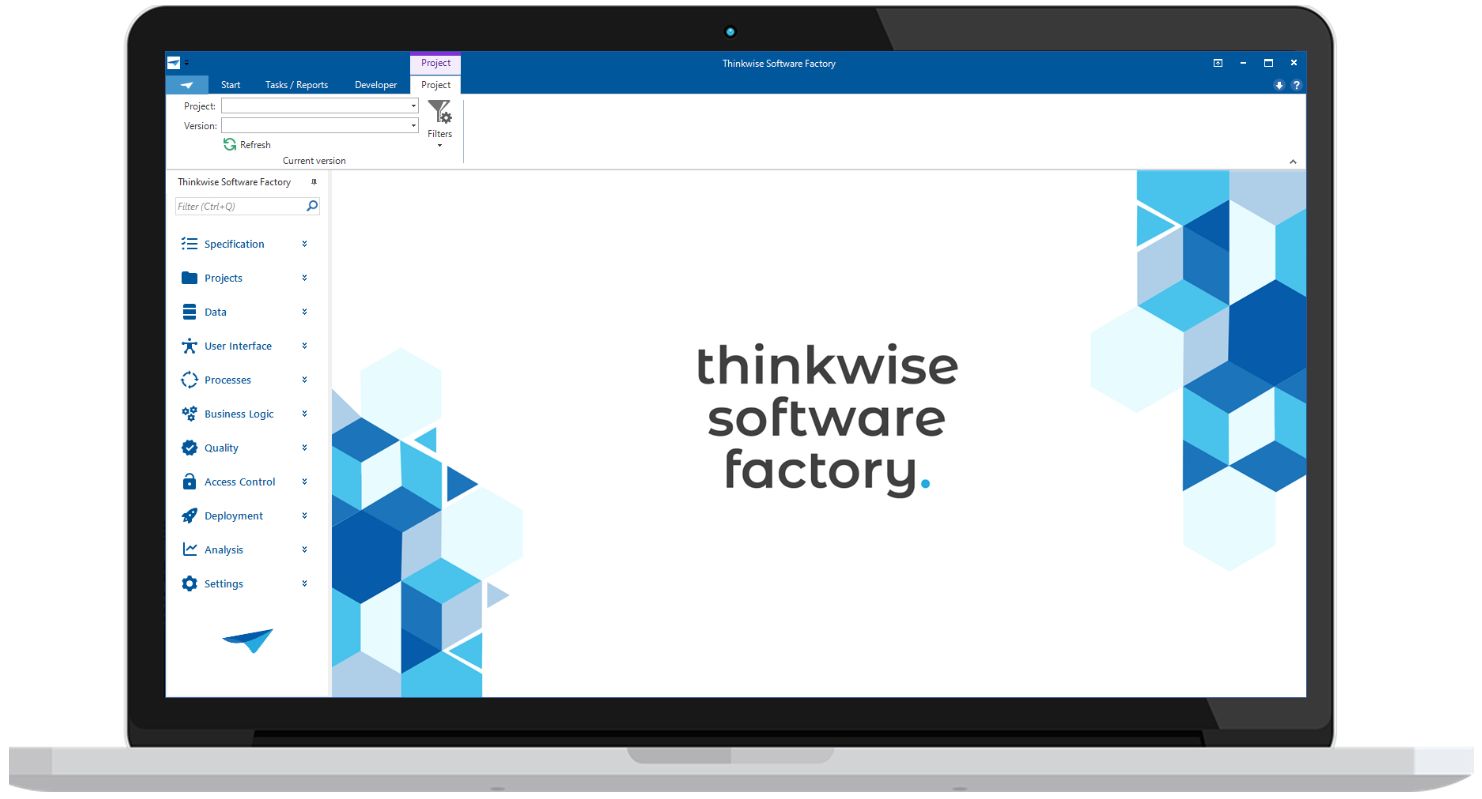 Start screen of the Software Factory
Analysis
The business processes and requirements can be seen as a contract between the business and the IT developers, with which the scope of the project is continually monitored.
Business processes
During the analysis phase, the function flow diagrams are designed first. The relationship between a business process and the functional entities, such as departments, are specified there. These functional entities are displayed on the horizontal strips. The function flow diagrams are often designed based on interviews with the interested parties of the project. Other elicitation methods can be applied such as analysis of the existing application, documentation, observation of end users, etc.
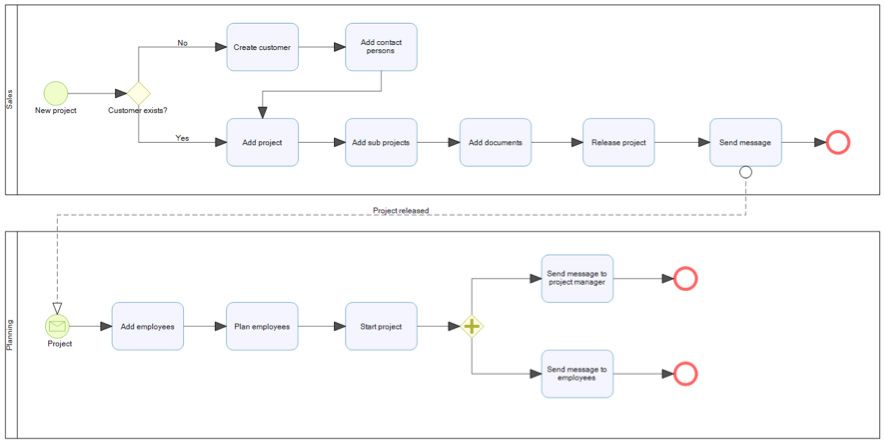 Example of a function flow diagam
Requirements
The user and system requirements are subsequently specified for each process.
The function flow diagrams and requirements must be accepted by the stakeholders before the next phase is started. This may be done module by module.
Design
Translating the system requirements to an application can be done in multiple ways. Design is used to describe how the system should be implemented in a technical way. Design decisions can be recorded here for future reference.
The paragraphs of design specifications can be used throughout the modeling process as a to-do list. The SF automatically maintains the traceability between the design specifications and the model.
Modeling and Validation
The following things are specified during the modeling phase:
- Data model
- User interface
- Tasks
- Reports
- Business Intelligence
- Process flows
- Help
- Dynamic model
All these components form the basis for the application without it being necessary to have to program them. Only the model has to be created. This takes place based on the requirements as drawn up in the previous phase. The quality of the model is monitored with the Validator. Thinkwise provides hundreds of validation rules, but company specific validation rules can also be added.
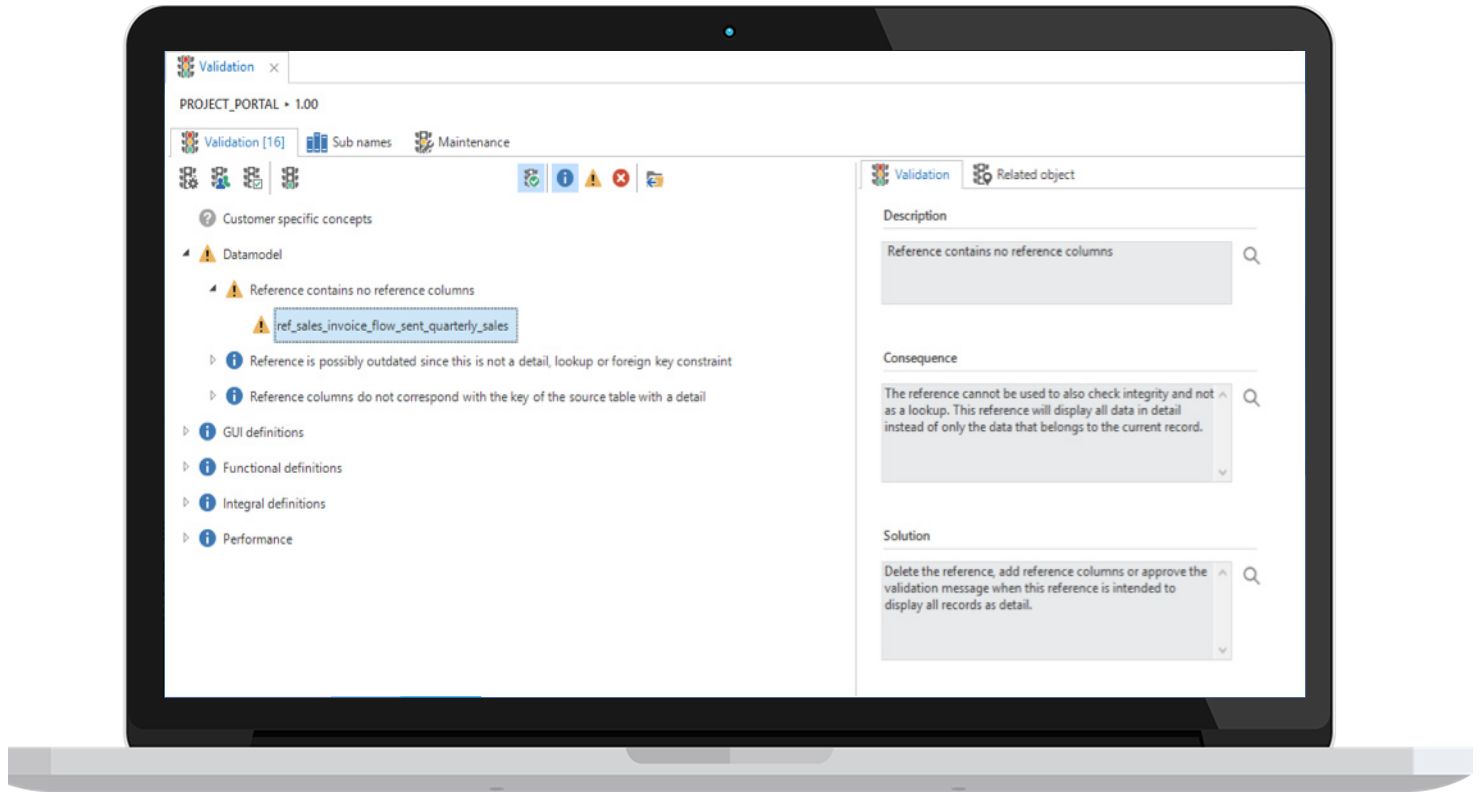 Example validation rules
When the model is created, a demonstration can be given to the business to show at an early stage what the application will look like and how it will work. This demonstration helps build a bridge between the business and IT.
Data model
The database of the application is designed using the data model which is presented graphically, as shown in the figure below:
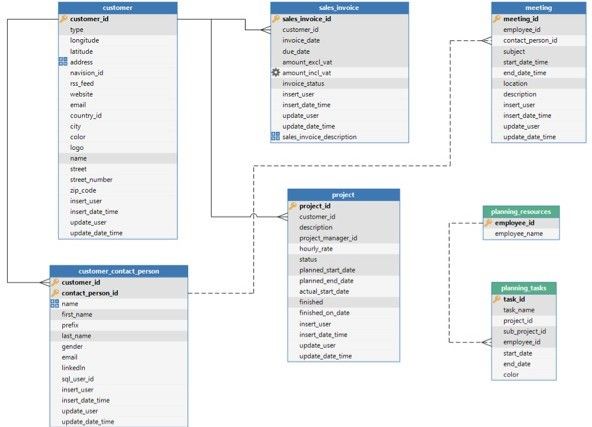 Example of a graphical data model in the Software Factory
User interface
The GUI is also designed without programming. The design is flexible so that screens automatically adjust themselves to the various resolutions. By linking (self-designed) screen types to the subjects of your model, a GUI can quickly be developed for hundreds of objects.
The GUI is multilingual and contains possibilities for integrated Business Intelligence, both pivot tables as well as graphs. In addition, graphical plans and geographic presentations are easy to integrate.
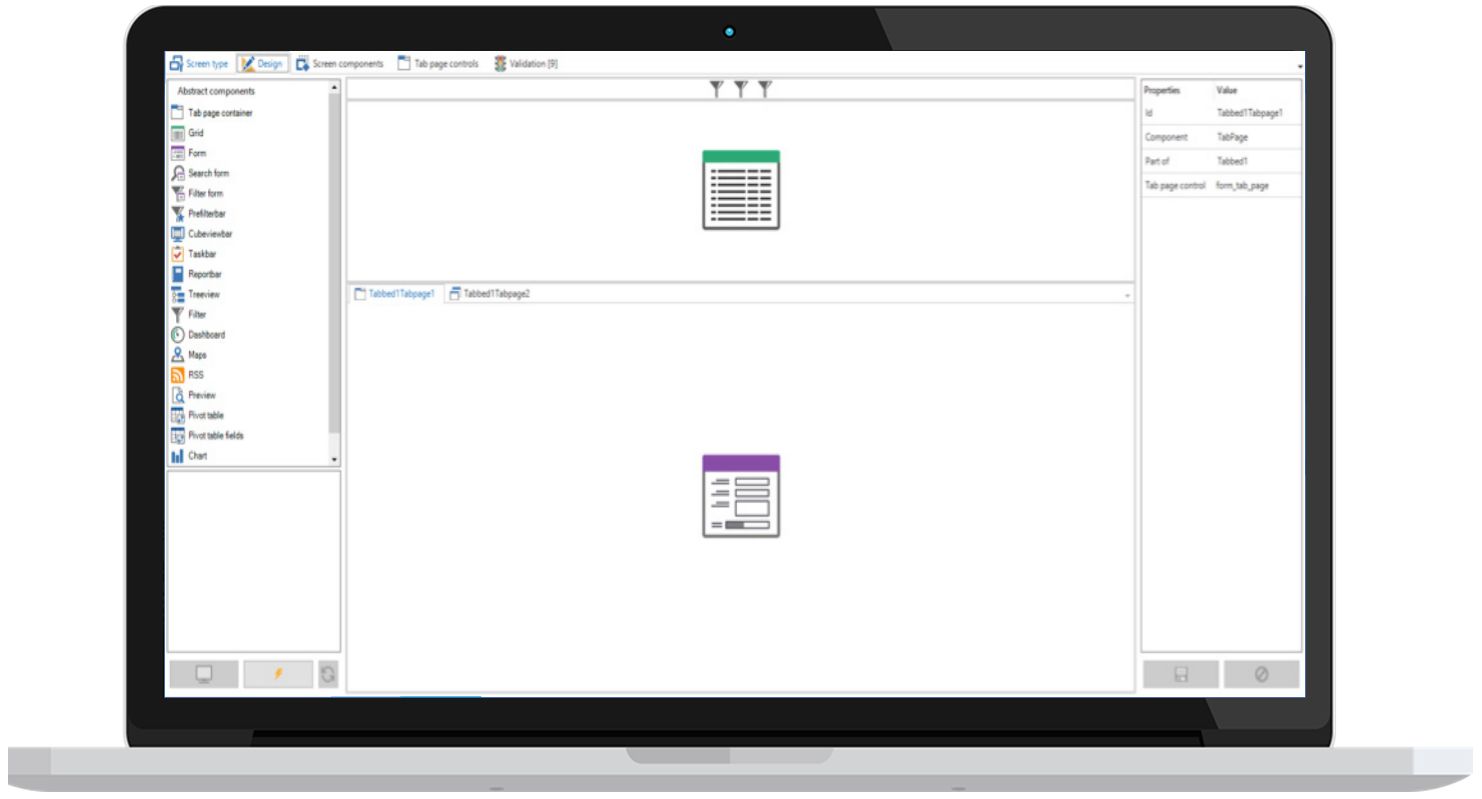 Modeling a screen type
Tasks
Batch or interactive tasks (jobs) can be modeled, for instance, to execute a calculation or generate invoices. These tasks can be started automatically by a scheduler or manually via the GUIs. Interactive tasks can request the user for input before they start.
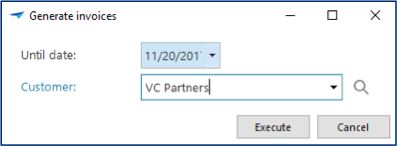 Example of a task popup
Reports
For the generation of reports, a connection can be made to various reporting tools, such as DevExpress Reports, Crystal Reports, Microsoft Word, SQL Server Reports and i-net Clear Reports. These reports can be viewed, printed, mailed and exported to various formats automatically or via the GUIs.
Business Intelligence
The Thinkwise GUIs include integrated Business Intelligence functionality for the presentation of interactive pivot tables and graphs, whereby operational management information can be made available in a simple manner. It is also possible to connect with Microsoft OLAP (SQL Server Analysis Services).
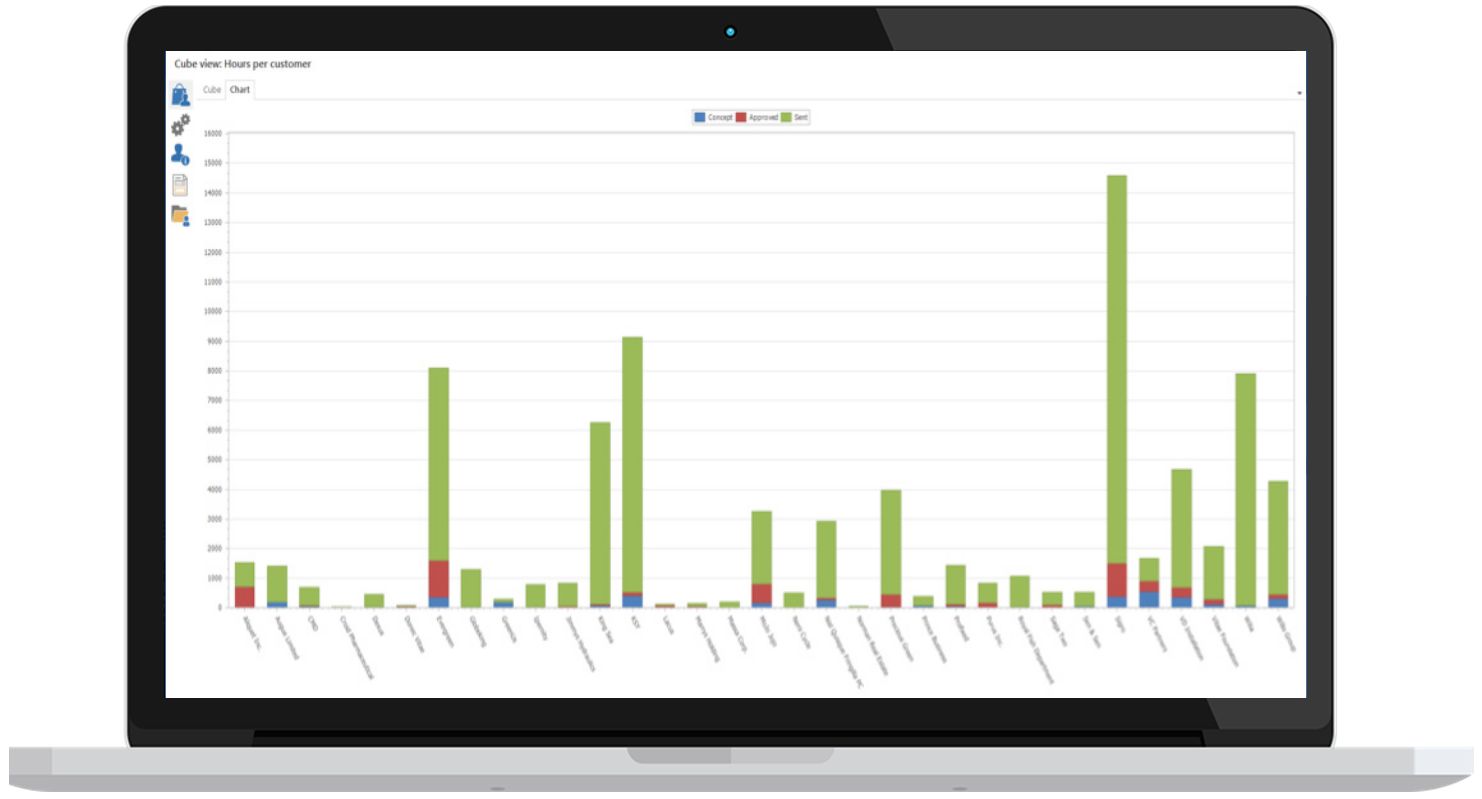 Example of integrated charts
Process flows
End users are automatically guided through the application with the help of process flows, where the subsequent process steps that must be acted upon are presented to them. Process flows are designed graphically, as seen below:
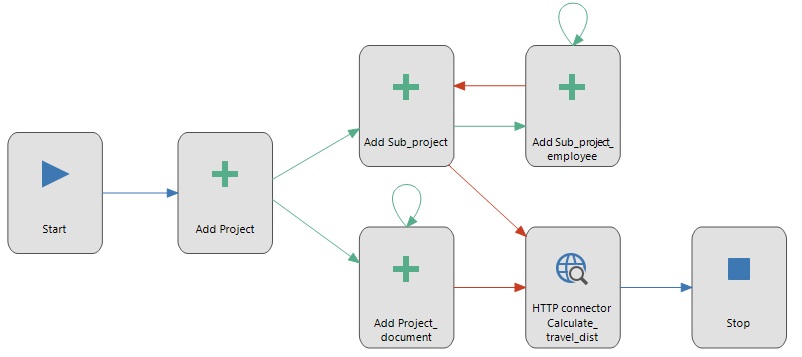 Example of a process flow
Help
Help text can also be defined in the SF, for each process as well as for each object. The help text can be set up fully multilingual. The GUIs are context sensitive and immediately display the relevant part of the help text.
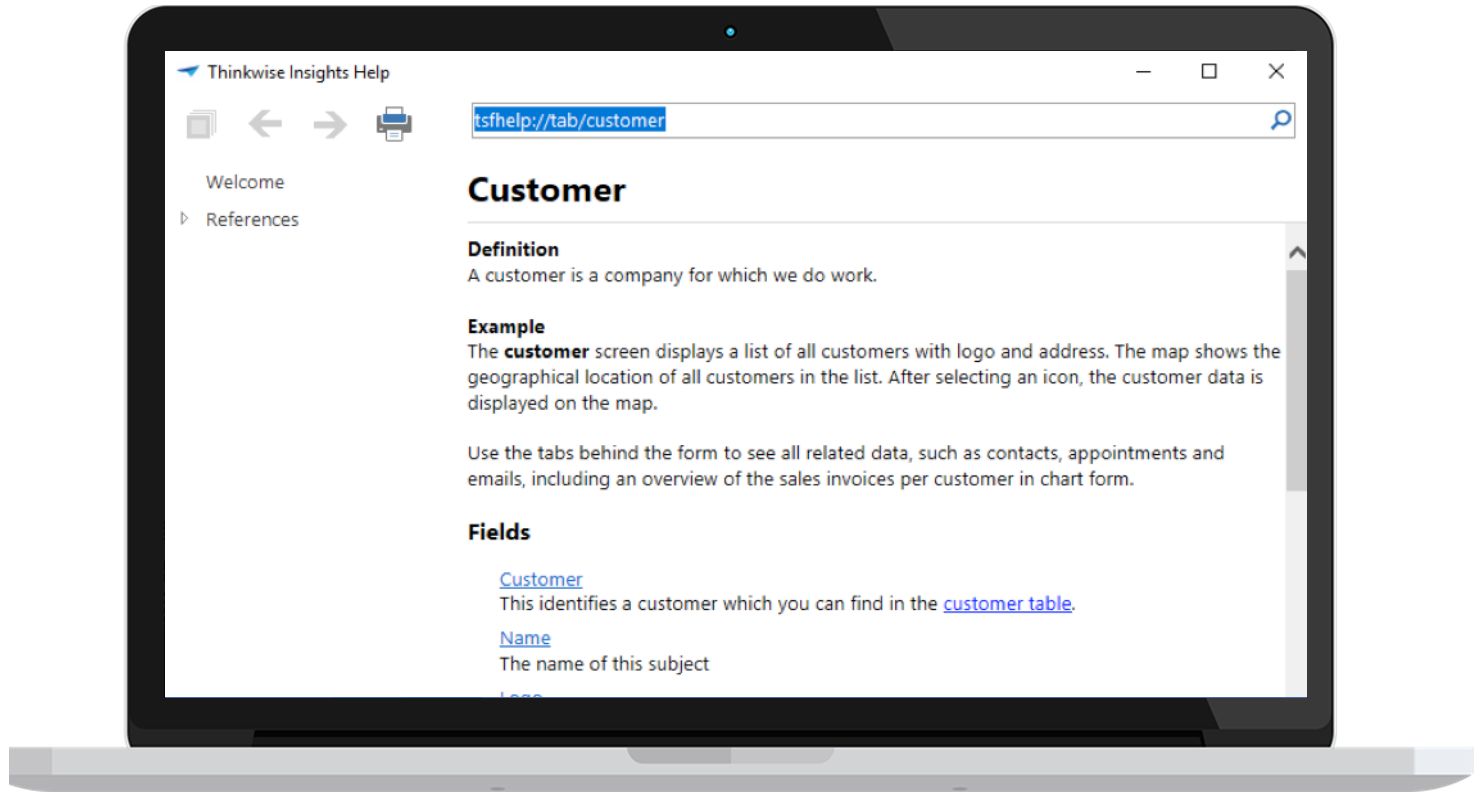 Example of the help text
Dynamic model
By including meta procedures in the generation process, the model can be automatically extended. This particularly concerns aspects of the data model and GUI model that form a main theme throughout the application.
The following are examples of this:
- Adding trace columns (added on/by, changed on/by) to all tables and display on a separate tab in the GUI.
- Add an update counter column to tables which are updated.
- Create indices on standard forms of the GUI
As soon as a meta procedure is added, the aspect is automatically added and requires no more maintenance if the model is modified or extended. SQL must be programmed once for each meta procedure and requires knowledge of the SF database and its concepts.
Development and Testing
The last phase of the project consists of programming and testing the business logic.
Development
Code templates are written according to the design specifications. This is the only component that is actually programmed. Templates are woven into the correct position in the business logic layer based on the definitions in the model.
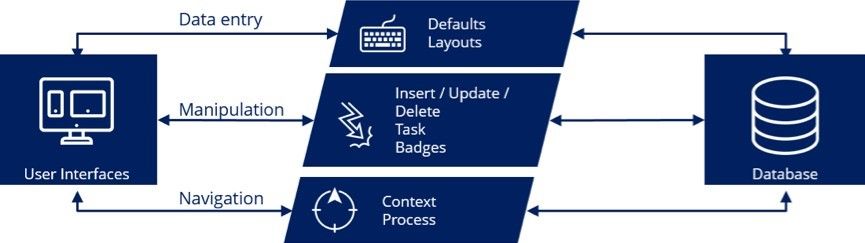 Architecture of the programmed business logic
Testing
The programmed templates can be tested automatically with test cases that are stored in the Software Factory. A test case can be created in three ways:
- Recorded via the GUI.
- Input via the Software Factory.
- Automatically derived from the existing model.
A test case is linked to the templates that are then used for testing. Checks are included in a test case to examine whether the templates work correctly. It can also be easily checked whether each template appears in at least one test case.
A test case can subsequently be executed automatically and the test results stored in the Software Factory.
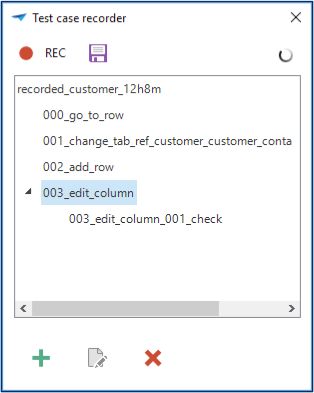 Recording test cases via the GUI
The test results are also analyzed there.
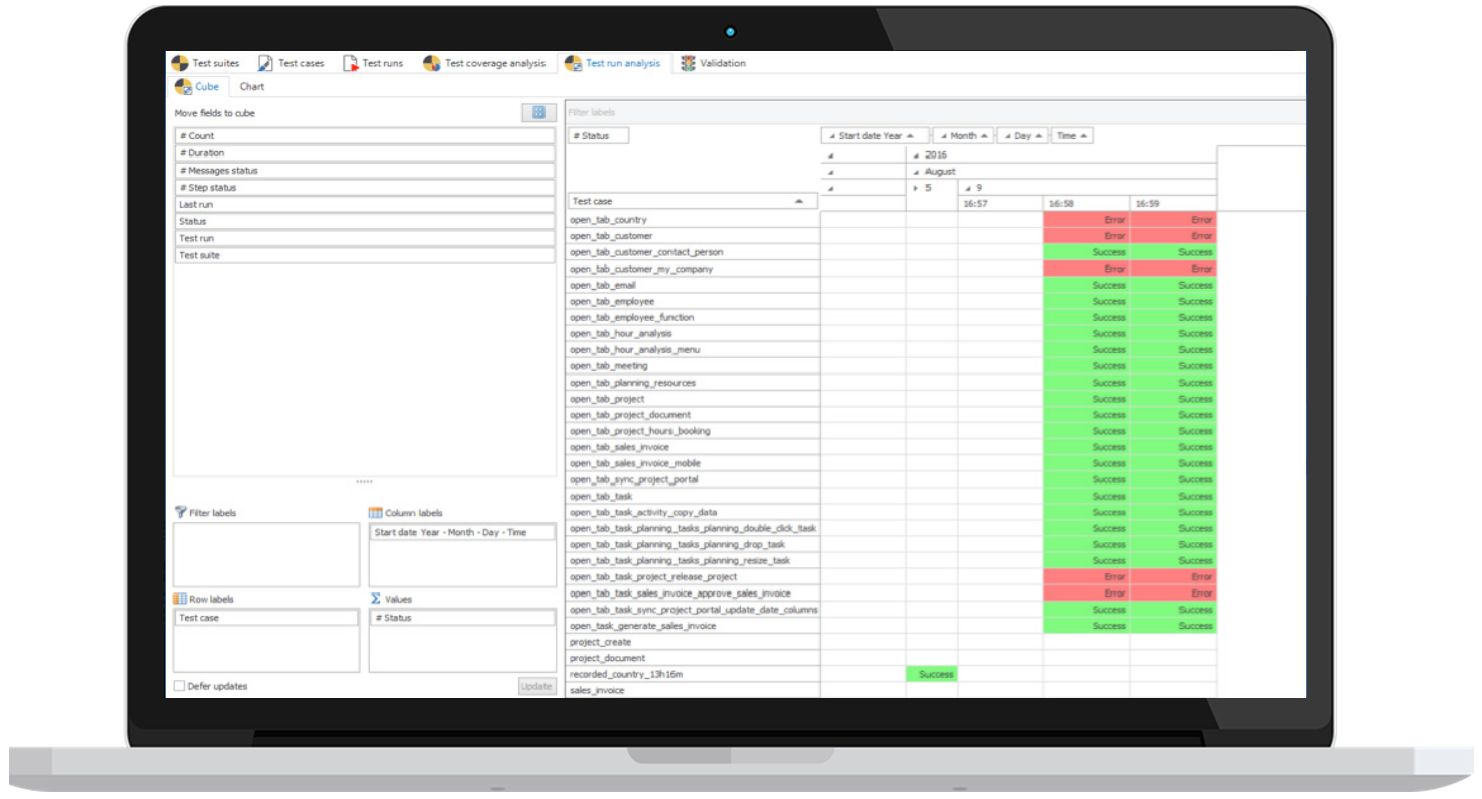 Analysis of the test results
With test tooling, a test only needs to be specified once and can thereafter be executed automatically. This guarantees that existing functionality continues to work after any additions and modifications.
Naturally, these additions and modifications need to be included in the test cases.
Support
Along with the development tools, Thinkwise also offers tools to analyze the model and convert it to an actual application. These tools can be found under the menus System Administration, Deployment and Management”.
Version control
The continued development of the model of an application takes place in the SF on a version by version basis. By performing a difference analysis between two versions, it is automatically determined what must be modified in the database and business logic. The data in the database is retained and will automatically be converted to the new structure.
DTAP
Usually a DTAP street is used during development. DTAP stands for the Development - Test - Acceptance - Production process of which every version must pass through. By working in versions the Thinkwise Platform is extremely suitable for this.
Working in teams
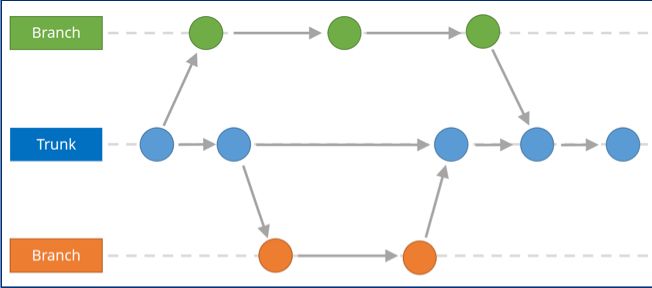
A model for an application can be split into one or more branches. This allows different teams to work on the same application (within their own branch) without getting in each other’s way.
Finally, the modifications and expansions of a branch are combined (merged) with the trunk (the production version). Conflicts can possibly occur during merging, but these are automatically detected by the Thinkwise Platform and presented to the developer.
 Example of branching and merging
Intelligent Application Manager
With the help of the Intelligent Application Manager, applications are provided with authentication, authorization and user preferences in a simple and well-organized manner.
Users get one user interface with which they can obtain access to all applications to which they are authorized. These applications can even be located on different servers and RDBMSs.
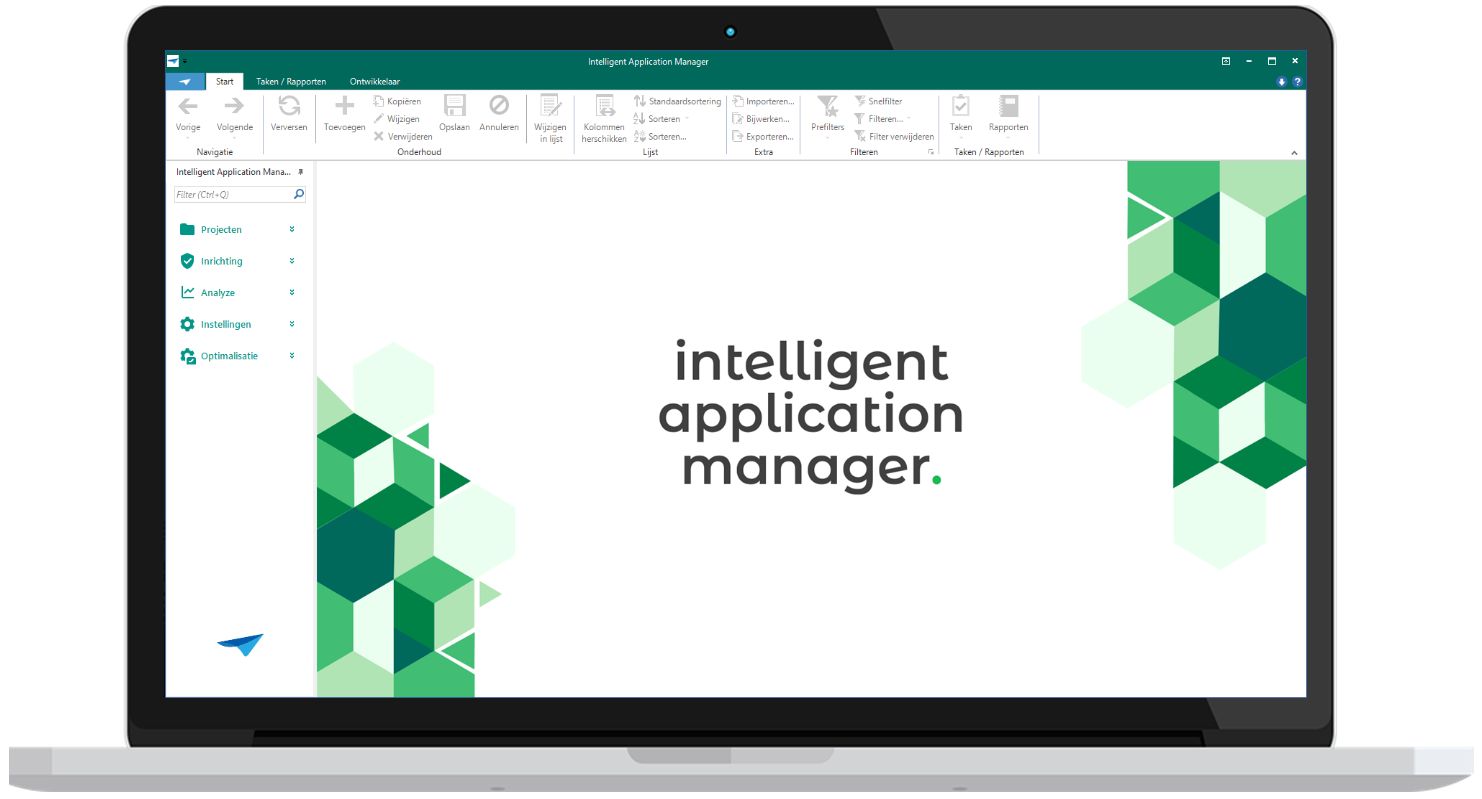 Start screen of the Intelligent Application Manager
The Intelligent Application Manager has the following components:
Synchronization
To include a new or existing project version as an application in the IAM, it is necessary to synchronize it with the SF. This means that the blueprint is copied from the SF to the IAM. As soon as this has taken place, the authorization for this application can be set up via the IAM.
Authorization
Authorization is linked to roles and user groups using Role Based Access Control. A user group contains several users, but a user may also be a member of several user groups. If required, a membership is time-related so that rights automatically expire after a period of time (for example with temporary contracts).
Authorization can be defined down to field level and on cross-sections of data.
The users can be authenticated via Active Directory, the RDBMS, IAM authentication or Open ID.
User preferences
In addition, it is possible to set user preferences. For example, splitter positions can be retained, positions of columns modified and even entire screen types can be changed.
Everything a user can do with regard to user preferences can be authorized.
Self-learning
For each user, the application manager can specify whether specific (or all) actions of the user are registered in the GUI.
Through analysis of the user’s method of working, the user preferences for the user in question can be optimized automatically by IAM.
Example
If a user frequently opens the customer screen and then filters on a customer, IAM can recommend opening the customer screen with the application. This will not immediately retrieve the customer details from the database, but firstly display the filter screen. This leads to fewer user actions and a lower load for the server.
The analysis can also be reason to provide the user with additional training.
Simulation for the help desk
Because the GUIs can differ for each user through authorization and user preferences, the help desk can look at the application based on the blueprint of a specific user. The help desk employee then sees the same GUI, data and user preferences, and can provide better support to the user.
Logging
All changes regarding authorization are logged automatically. This logging helps to keep the application SOx Compliant and satisfy important guidelines with regard to control.
User Interfaces
The GUIs are available in various technologies such as Windows, Web and mobile devices. These can also be deployed alongside each other in one application. Thinkwise ensures that the GUIs will also become available for future technologies so that the applications automatically remain up-to-date.
The GUI does not have to be programmed. It is completely built up during runtime on the basis of:
Model
- contains the definition of the GUI.
- is defined in the SF and synchronized with IAM.
Authorization
- omits everything for which a user is not authorized.
- is defined in the IAM.
Lay-out
- consists of color scheme, logos, etc. and can, for instance, differ for users of a customer in a customer portal.
- is defined in the SF and selected in the IAM.
User preferences
- provide an individual display of the things that a user is authorized for.
- is provided from the GUI and recorded in the IAM.
The GUIs are fully multilingual and communicate with the same business logic layer.
A brief summary of the functionality for each type of GUI is given below. A comprehensive description is given in the various manuals. The screen examples come from the Insights application that is used by Thinkwise for training purposes.
Windows
Functionality
The Windows GUI provides a wide range of default functionality, available through the integrated ribbon, button bars and the context menu.
Data can be visualized in hierarchically structured screens with multiple subjects, using grids, forms, maps, charts and pivottables, document previews, dashboards, gantt charts and more.
The user interface supports different reporting options and import, export and mass update of Excel and csv files.
Data can be added, updated and deleted using forms, inline editing in grids and task popups.
Individual fields can be displayed and edited using regular text- and numeric controls, calculators, calendars, checkboxes, links, barcodes, rich text and html controls, progressbars, radiobuttons and more.
Extensive search and filter options are available using predefined filters, Excel-style filtering, a powerful search box and an advanced filter popup to create complex filterconditions.
The userinterface also supports drag-drop of rows and files, clipboard actions, window docking and multiple windows.
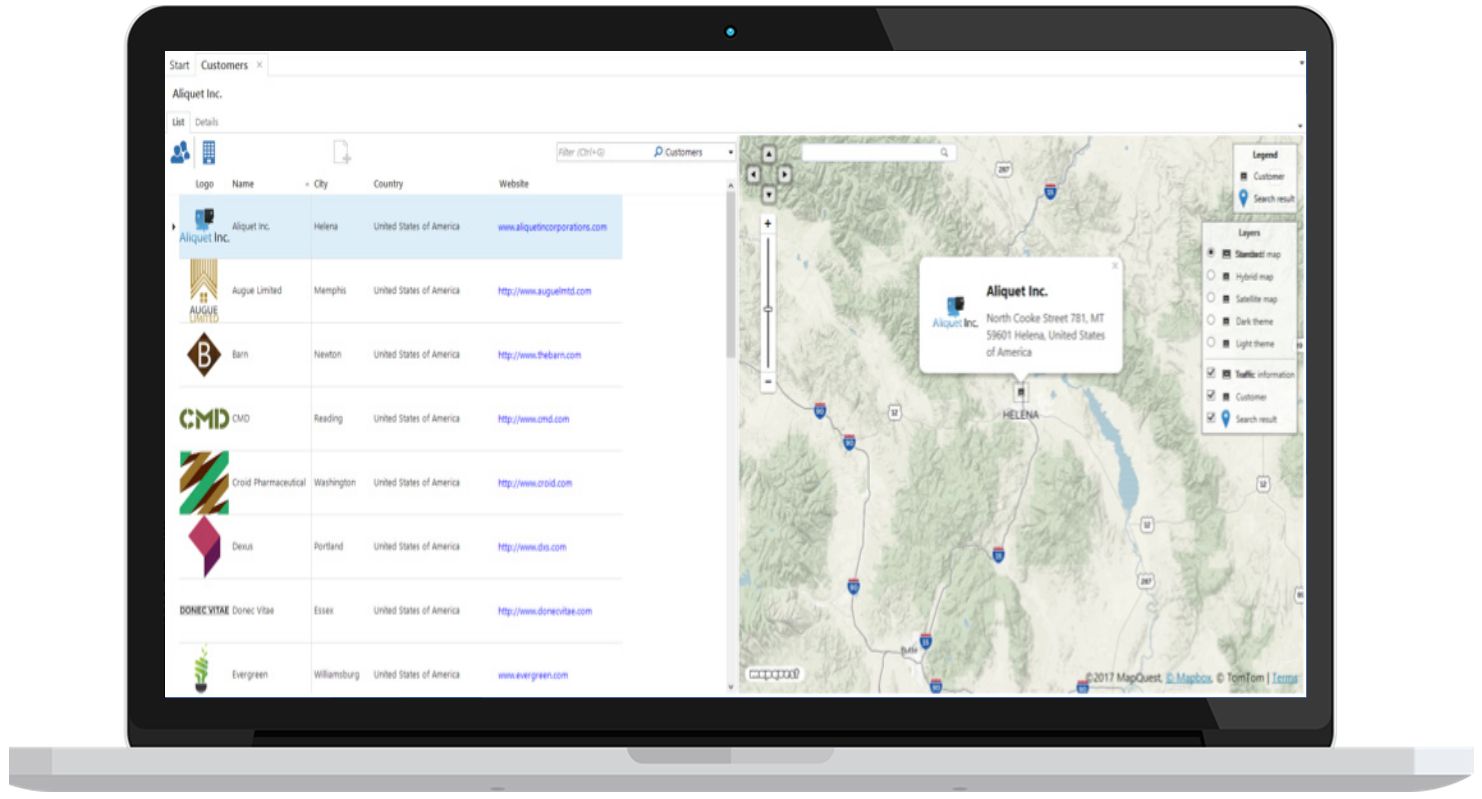 Example screen of the Windows GUI
Deployment
The Windows GUI can be deployed centrally with the help of the Thinkwise Clickstart tool. If the GUI is started on a desktop, it is first checked whether a newer version is available centrally. If this is the case then this version is copied to the client and only then started up.
A new version is only required if Thinkwise has expanded the standard GUI functionality, and not if the application itself has been modified. This takes place via the model.
The Windows GUI can also be run under Citrix, Terminal Server and VDI.
Web
The web GUI does not require any browser plug-ins and supports the following browsers:
- Internet Explorer (version 11 or higher)
- Mozilla Firefox
- Google Chrome
- Apple Safari
- Microsoft Edge
Functionality
The functionality of the Web GUI is identical to that of the Windows GUI.
Example screen of the Web GUI
Mobile devices
The User Experience of working with a mobile device is completely different (for example swiping) than working with Windows or Web GUI. To optimally use the smaller screen the GUI utilizes a different screen structure. It is however driven by the exact same model.
In addition, the GUI for the mobile devices contains possibilities for working offline. The data can be stored locally and synchronized with the central application as soon as the device is online again. If business logic is required in the offline mode, this is programmed separately, as the central set of rules is not accessible.
The Mobile GUI is suitable for Apple iOS and Google Android.
Tablet
An example of a tablet display is given below:
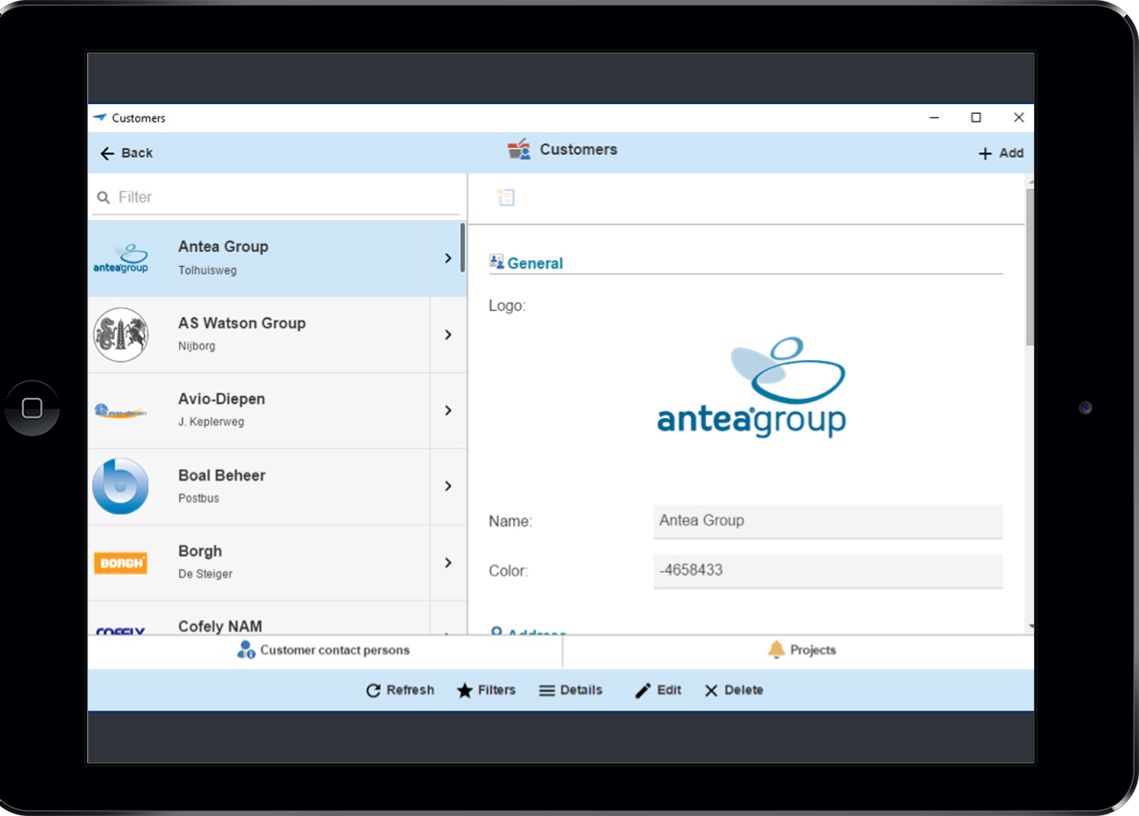 Example screen of the tablet GUI
Smartphone
An example of a smartphone display is given below:
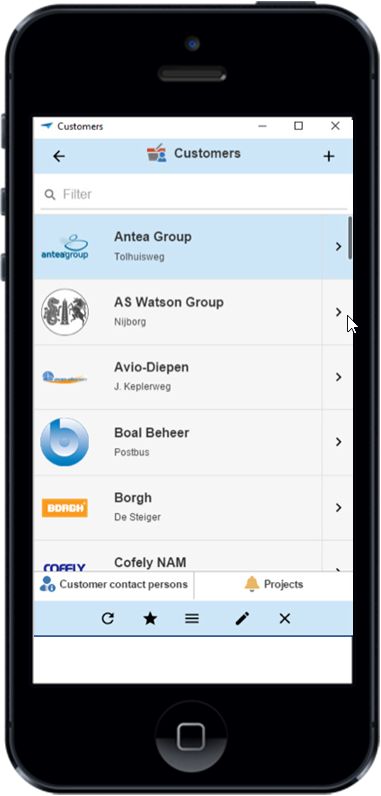 Example screen of the smartphone GUI
Appendices
The appendices consist of the following components:
- A summary of important properties in the factsheet.
- A selection of reference customers that have purchased an application that is built with the SF or have themselves purchased a license for the SF.
- An overview of the measured productivity.
Factsheet
| Group | Property | Values |
|---|---|---|
| Technology | RDBMS | SQL server, Oracle, DB2 |
| Business rules | SQL, C#, Java, Javascript (offline mobile) | |
| Modernized | RPG, Cobol, Foxpro, Access, Excel, VB6, | |
| Productivity | ERP | < 1.0 hour per function point |
| Peripheral application | < 0.5 hour per function point | |
| Connectivity | Financial | SAP, Exact, Navision, Muis, AFAS, Davilex |
| Exchange | ||
| BPM | BizzDesign | |
| Workflow | Bonita | |
| Requirements | CogNIAM | |
| Other | Via web services |
References
The following companies are some of our references. On our website you will find an extensive list of our customers.
Productivity
Function Point Analysis
Function Point Analysis (FPA) is a method to measure the functional scope of an information system. FPA measures this functional scope by examining the functions and (logical) data collections that are relevant for users.The measurement unit is the function point (fp), and so the scope of a system is expressed in number of function points.
Function points are a good measure of the size of a system. The function point measurement unit can be used in several ways. An often-used application of FPA is the estimation of system development. The costs of developing a system are related to its size. The larger the system, the more expensive it will be. FPA can be used both for new development and for maintenance projects.
From previous experiences, it is known how many hours on average are needed to develop one function point. This defines the productivity. Size (number of function points) x productivity (required hours per function point) provides a basis for the project budget.
FPA is a objective method that does not require IT knowledge. With sufficient documentation, an FPA count for a system of 1000 development hours can be made in approximately 1 hour.
| Programming language | Hours per function point |
|---|---|
| Java | 10.6 |
| C# | 15.5 |
| SQL | 10.8 |
| ABAP | 19.9 |
| Other low-code platforms | 2.5 |
Market average for each technology
The Software Factory automatically counts the function points of an application. This point count is officially calibrated by the QSM authority. In addition, Thinkwise is a member of NESMA (Dutch Software Metrics Users Association).
| Thinkwise Customer | Hours per function point | Function points | Time in hours |
|---|---|---|---|
| Combifloat | 0.25 | 5536 | 1401 |
| DinZ | 0.10 | 53437 | 5312 |
| Foresight | 0.10 | 8938 | 851 |
| Laura Metaal | 0.14 | 15306 | 2124 |
| Manter | 0.55 | 4604 | 2546 |
| Paul Meijering | 0.26 | 14318 | 3674 |
| Vacansoleil | 0.39 | 16104 | 6243 |
| VDL | 0.56 | 22563 | 12594 |
| WEC Lines | 0.31 | 6730 | 2064 |
Function Point measurements of Thinkwise projects
The time spent in hours includes the design, development and test phase of the applications. The mentioned function points are based on one user interface technology only.