
Deep links
A deep link is a link which does not just point to the location of an application but also to a location within that application. For instance, a deep link could direct a user to a specific subject, a specific record within that subject, and perhaps start a task or report for that record.
Enable deep linking
Deep linking can be turned on for any process flow by simply selecting a process flow, navigating to the Deep linking tab and checking the Deep linking allowed box.
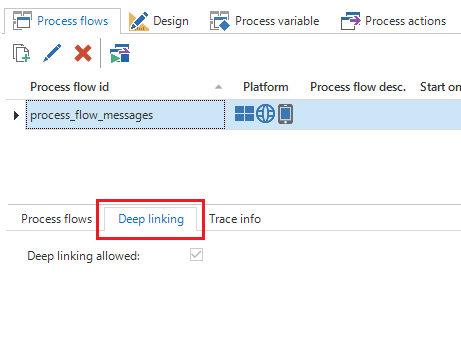 Deep linking
Using variables in a deep link
It is possible to provide values for variables in the deep link to allow more dynamic scenarios to be implemented, such as navigating to a specific record. If the variable needs to be allowed in a deep link, simply check the 'Available in deep link' box for the variable. Alternatively, check the 'Mandatory in deep link' box, if deep link needs to be mandatory for all new process flows.
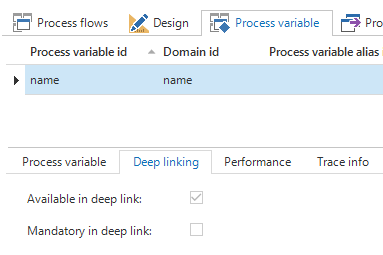 Process variable
Preparing and validating deep links
When a deep link is started, it might be necessary to validate or prepare some things before the process flow can be started. For instance, the variable values provided by the deep link might make no sense, and you might want to notify the user of this. Likewise, perhaps the process flow requires additional variables to be set before it can start but these variables are sensitive in nature and you do not want to put them in the deep link. To fulfill these requirements, implement the process procedure of the 'Start' action. Traditional process flows will never trigger the process procedure of this action but deep links will. In the process procedure, the values of the variables in the deep link will be received and, based on these values, the values of other variables can be set and determine how the process flow should continue.
Creating a deep link
Once a process flow for deep linking is configured, the link itself needs to be created in order to send it to someone, use it in an email or report template. The format of a deep link URL is as follows:
https://[server]/[web_application]/DeeplinkHandler.ashx?guiApplAlias=[gui_appl_alias]&processFlowID=[process_flow_id]&$[variable1]=[value1]&$[variable2]=[value2]
The template above needs to be filled out as follows:
[gui_appl_alias]needs to be replaced with the alias of the application in IAM. When starting the GUI with an SF metasource, this parameter can be removed from the URL.[process_flow_id]needs to be replaced with the ID of the process flow which needs to be started by the deep link.[variable#]and[value#]need to be replaced by the ID of the process variable and the value it should receive. Multiple variables can be specified in the deep link. Note that the ID of the process variable needs to be preceded by a $ sign.