
Applications
An application in the Intelligent Application Manager is a combination of a project version, a server and a database that will appear as a standalone application in the user interfaces. A project version can therefore result in several applications on different servers and/or for different databases. Each application has its own authorization and user preferences.
Create an application
A new application can be created via the applications screen.
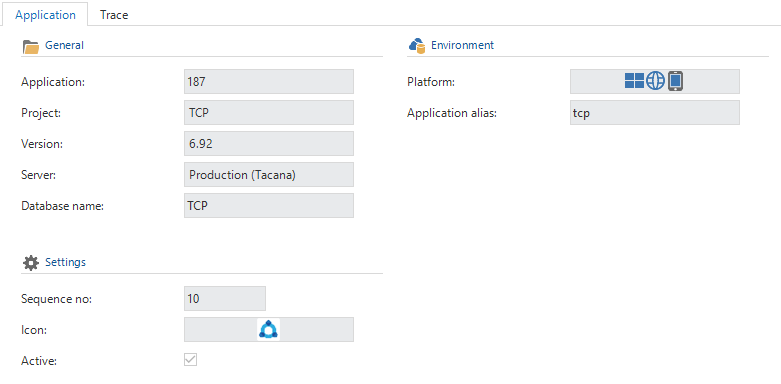
Create an application
The Sequence number determines the order in which the applications are listed in the user interfaces. An application will only show if the Active option is checked. Only activate an application after it has been set up completely.
The Environment group shows for which platforms the application is available and the alias used for the Indicium OData API.
Themes
To distinguish between multiple applications for the same project version, for instance in DTAP environments, it is possible to set a different theme for every application using the Set theme task.
Apply rights
Tasks are available to apply the required rights to the databases:
| Task | |
|---|---|
 Apply roles Apply roles | Creates the roles on the application database |
 Apply user rights Apply user rights | Creates the users and user groups on the application database |
 Apply user rights to IAM Apply user rights to IAM | Creates the users on the IAM database |
To be able to apply the rights to an SQL Server database, an IAM administrator who is not a database system administrator needs additional database rights. This can be done using the following code snippet:
use master
go

grant view server state to [login_name]
go
Translations
In the Translations tab page, it is possible to provide a translation and a tooltip for every application language.
Copy an application
It is also possible to copy an existing application, including its translations, settings, user preferences and authorization using the Copy application task.
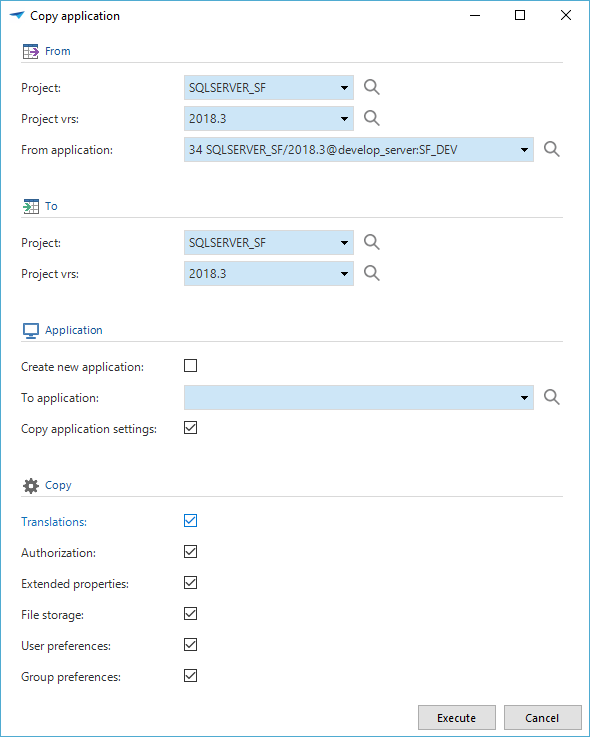 Copy application task