
Messages
Error messages, warnings or informational error messages are also modelled in the Software Factory, with the possibility to define a translation, severity and location. This applies to both messages that are sent from functionality (code templates) and messages that are caused by the database, such as constraints and checks.
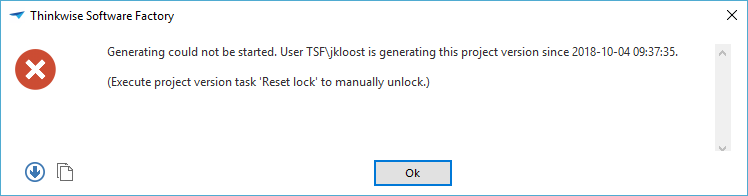 Example of a message as it may appear in an end product.
Modeling messages
The Messages screen can be found in the menu under User Interface.
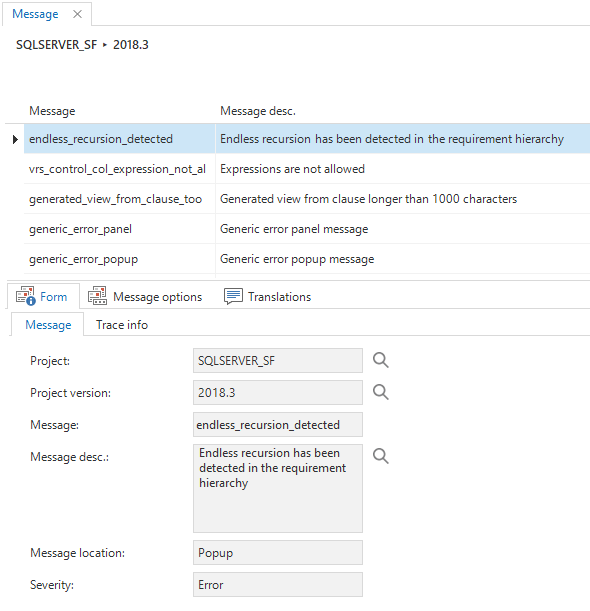 Overview of messages
The Message id is used to reference the message from the business logic. This ID is translated in the Translations tab page.
A brief description of the purpose of the message is given in the Descriptions tab.
Message location
The Message location indicates how the message should be displayed: in a pop-up, in a panel at the bottom of the screen, or none (suppress), used to suppress database messages.
It is possible to clear the panel with the message clear_panel or add a separator line to the panel by sending the add_separator message.
Severity
The severity of the message is determined here. This may be an informational message, a warning or an error message. The severity determines how the user interfaces and the Indicium application tier handle the action that caused the message. The action is only canceled for errors.
Message options
It is possible to add message options to a message. These options represent the choices a user can make when presented with the message when used in a process flow. For example, this configuration in the Software Factory:
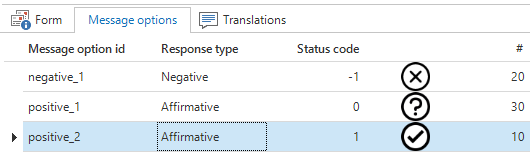
will result in this dialog in the GUI:
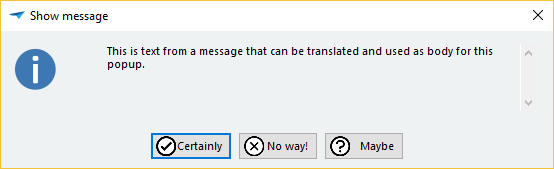
An affirmative message option will be given a unique status code of zero or higher, while a negative message option will be given a unique negative status code. These response types and corresponding status codes are directly related to the green and red arrows in the process flow. In some cases, it might be necessary to have multiple affirmative and/or multiple negative message options which have different effects on the continuation of the process flow. To achieve this, the Status code value of a message option will be passed as the Status code output parameter of the process action.
Icons are optional and the sequence number of the message option (#) determines the order of the buttons on the dialog.
Translations
In the Translations tab page, a translation can be specified in which parameters are defined with {0}, {1} etcetera.
Sending messages
To send a message from an SQL template, use can be made of the tsf_send_message procedure:
tsf_send_message [message id], [parameter string], [abort]
Parameter string
Optional parameter string with which parameters in the translation can be filled. This is an XML string in which the various parameters are given. It is also possible to use translations of model objects, such as columns or tables.
An example parameter string, which specifies the text Welcome for parameter {0} and the plural translation of column name of the customer table for parameter {1}:
<text>Welcome</text><col tabid="customer" colid="name" transl="plural"/>
The following XML elements with associated attributes are recognized:
<text>Text to display</text>

<tab tabid="tab_id" transl="standard, form, grid, plural"></tab>

<col tabid="tab_id" colid="col_id" transl=""></col>

<domelement domid="dom_id" elementid="element_id" transl=""></domelement>

<task taskid="task_id" transl=""></task>

<taskparam taskid="task_id" taskparam="task_parmtr_id" transl=""></task>

<report reportid="report_id" transl=""></report>

<reportparam reportid="report_id" reportparam="report_parmtr_id" transl=""></report>
For example, for message duplicate_customer with translation 'Note, {0} already exists as a {1}':
exec tsf_send_message 'duplicate_customer',
  '<text>Thinkwise</text><tab tabid="customer" transl="standard"/>', 1;
Results in 'Note, Thinkwise already exists as a Customer'.
Abort
Indicates the database severity level.
For SQL Server, specifying 0 results in a database message with severity 9, and 1 results in a database message with severity 16. Because SQL Server does not do a rollback automatically, a rollback and return have to be explicitly executed to abort a transaction. For example:
exec tsf_send_message 'duplicate_customer', null, 1;
rollback;
return;
For Oracle, specifying true results in a raise_application_error which will abort the transaction and false results in a dbms_output.put_line.
For DB2, the abort parameter is ignored as a transaction and is always aborted when a message is sent. In order to still provide informational messages on DB2 in defaults and layouts, these logic concepts have an extra parameter v_message_text that can be set to show in an informational message.