
Process analysis
Analysis is the basis of software development processes. The requirements that are placed on the product by the stakeholders are specified here. For example, the objective, the user tasks and the required functionality of a software system can be described by means of requirements. With business processes, the activities described are those performed by people and systems in a company. The definition of the business processes and requirements is the first step when developing with the Software Factory. This bridges the gap between business and IT.
Setting up an analysis
Thinkwise recommends the following procedure when setting up a new analysis:
Set up the business processes and define the requirements.
Set up the system requirements.
Draw up design specifications and link the system requirements to them.
Optional: Set up modules and link the design specifications and system requirements.
The components business processes, requirements, design specifications and modules are explained in the following paragraphs.
Business processes
The business processes are identified to arrive at a complete set of functional requirements for the system. By assuming the present (or desired) business process, it can be established with certainty whether the system contains all functions to support the business process. It is clear for each component of the business process where the system provides support. Furthermore, there are no functions added to the system that do not support the process. It is easier to go through the processes (that employees of the company carry out) with the stakeholders and so to arrive at system requirements than to directly define the system requirements.
Specifying the business processes takes place in the Software Factory by means of BPMN models (Business Process Model and Notation 2.0).
A new model is created for which the components that can be used are available in the left hand table. The activities in these models are the user requirements. A major benefit of this integration is that requirements and models are always traceable.
The components can be selected and added to the plan by means of drag & drop.
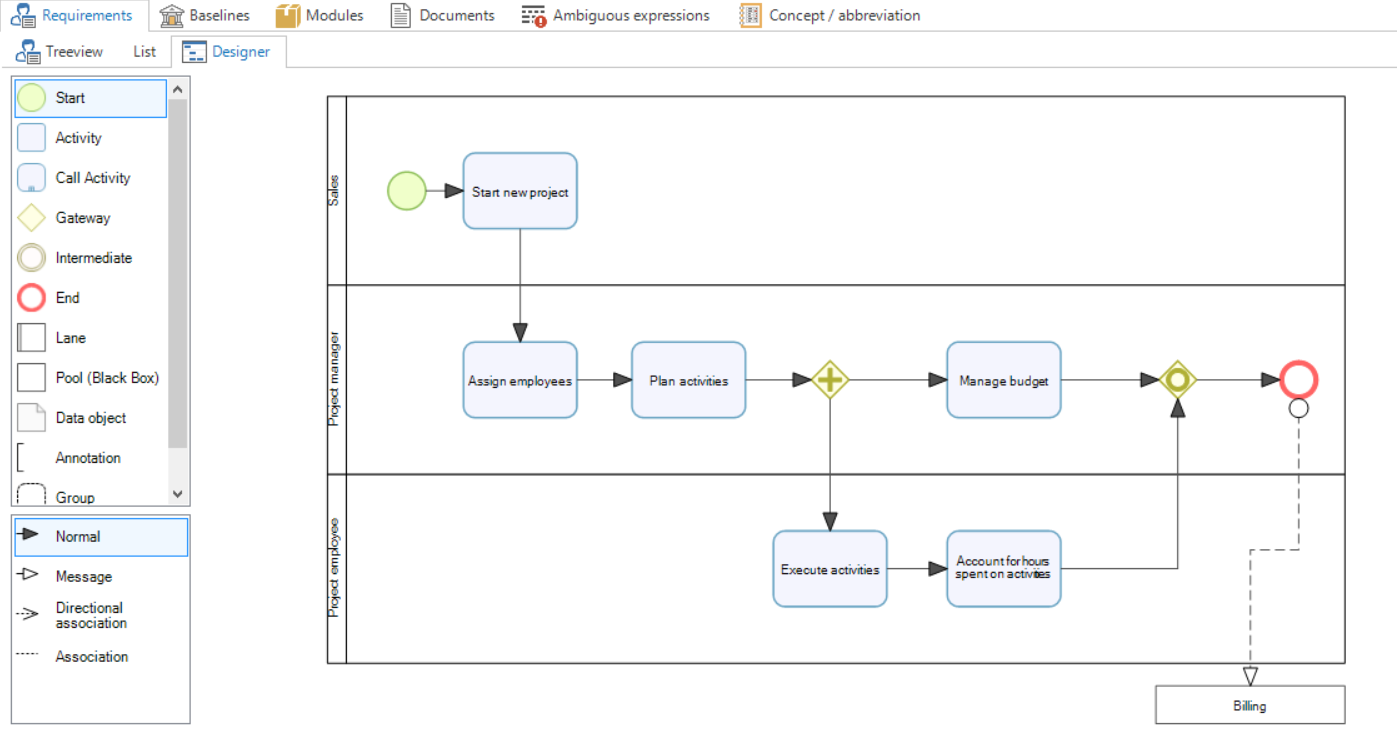 Overview of a business process
Set up business processes
To clearly explain how a business process can be set up, we make use of an example.
The main process can be specified by means of tasks. This is called Activity and Call Activity within the Software Factory. These are dragged into the diagram and connected with an arrow. Ensure that the BPM guidelines are applied with regard to the set up. A task can be given a name by clicking on it.
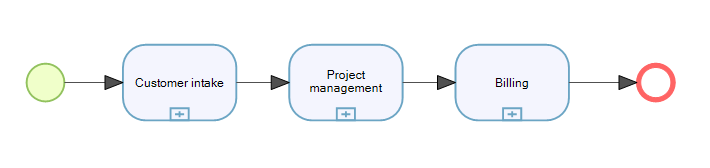 Main process
This primary process displays three Sub-processes, recognizable by the plus sign at the bottom of the task. Each Constituent Process can cover several swimming lanes. For this reason, the main process itself has no lanes. When we zoom in on one of the processes (Customer intake), we see the first example of a lane.
A lane is often assigned to a group or department (actor) which is responsible for the steps within the lane.
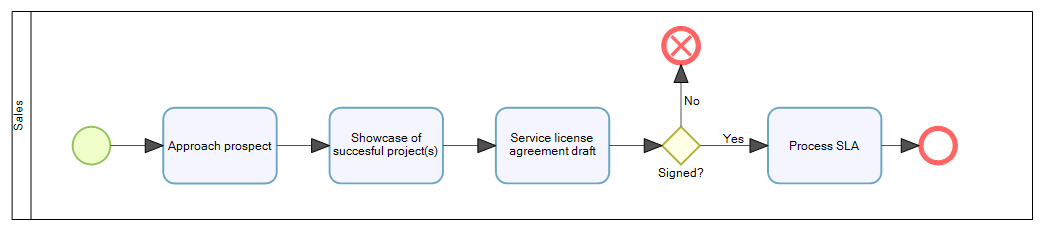 Constituent Process
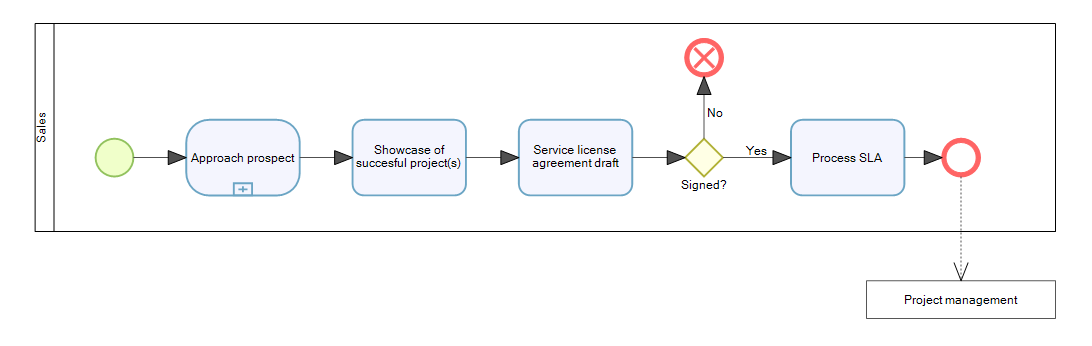
This constituent process has four tasks, Approach prospect, Showcase successful project(s), Service license agreement draft and Process SLA which are carried out sequentially. The lane indicates who, or which group, is responsible for carrying out the tasks.
By means of a Black box (indicated by Project Management in the example below), it can be indicated what the subsequent steps are after carrying out the tasks in the current lane.
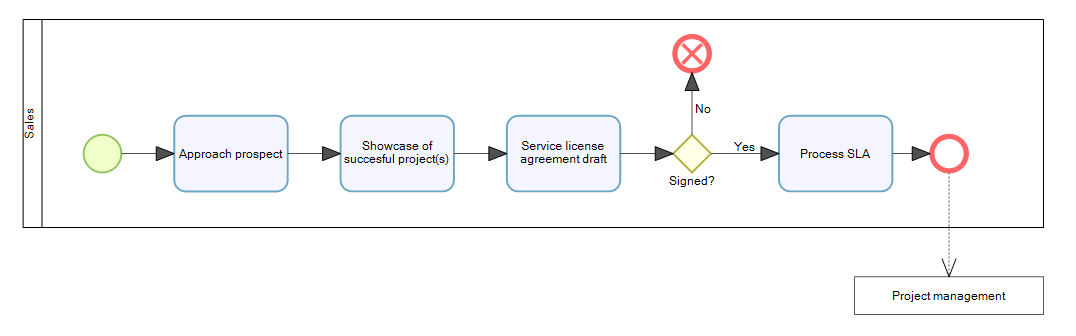 Constituent Process with black box
When a group of tasks becomes too complex for one diagram, a sub-process can be introduced. This refers to an own group of tasks.
 Constituent Process with a sub-process
This sub-process does not need to be in a lane since it is part of the same process.
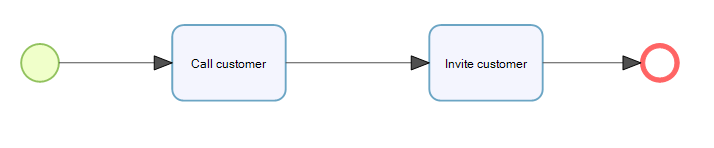 Sub-process
It is not recommended to create sub-processes in sub-processes. In general, this does not improve the overview.
When a sub-process is called in several diagrams, it can be created as a Call Activity. These are recognizable by their thick edge and plus sign at the bottom.
 Sub-process with call activity
Entering the ID number or name of the call activity is sufficient to call the reference.
Requirements
Once the business processes have been set up, it is now time to give further shape to the requirements. On the requirements tab, the system requirements can be linked to the specified user requirements. These user requirements were automatically created when the process was drawn. Each activity and call activity is an own user requirement. Before we discuss this in more detail, we first have to examine what requirements exactly are and which variants there are.
The specification of Requirements in the Software Factory is based on two standards:
- IREB - the deviser for the international certification Certified Professional for Requirements Engineering (CPRE). It is the role of the IREB to draw up a universally accepted international qualification scheme, focused on Requirements Engineering for professionals, through the provision of core syllabi and through the establishment of guidelines for the accreditation and the research. The accreditation process and the certification are regulated by the IREB steering committee.
- IEEE 830 - states that the following objectives are achieved through the drawing up of requirements:
- Requirements serve as the basis for which an agreement can be reached between the customer and the software supplier about what the product has to do.
- Drawing up requirements reduces the effort that is involved in the development of the software because any uncertainties are identified at an early stage.
- On the basis of the requirements, an estimation can be made about the magnitude of the development process.
- The requirements offer a benchmark for validation and verification of the end product.
- Through the platform independent nature of requirements, these can be reused in other environments.
- Requirements serve as a basis for modifications to the system.
The manner of input and the various levels (Business Requirements, User Requirements, System Requirements) are explained in more detail in the following paragraphs.
Specifying requirements
A number of steps are gone through to specify the requirements.
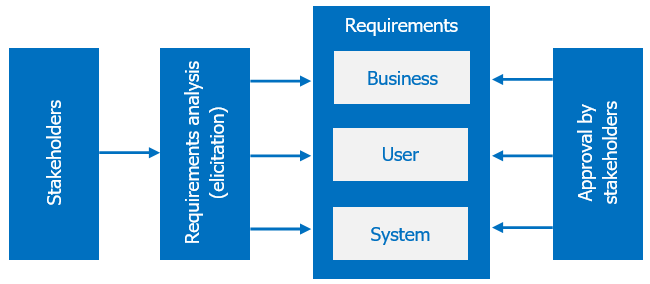 Schematic overview of the requirement steps
Firstly, the stakeholders are identified by the requirements analyst who will then identify the wishes and requirements of the stakeholders and translate them into requirements. As a third step, a distinction is made between the types of requirements. These requirements are then submitted for approval to the stakeholders. A number of iterations can follow until the requirements are complete and approved. A baseline can be made from this set of requirements and a report printed.
Requirement types
Requirements are divided into three types: business, user and system requirements. Furthermore, the system requirements are sub-divided into two kinds of requirements: functional and non-functional requirements.
Business requirements
The business requirements describe the why question. These requirements form the basis for vision and scope documents for the project, such as the project plan. Moreover, many user requirements are derived from business requirements.
Example
The business wants to make the declarability of the employees transparent to be able to better control the outsourcing branch.
User requirements
The user requirements represent the what question. The term user here stands for every possible stakeholder.
Example
The sales employee sends a quotation complete with an article specification, total price and general terms & conditions to the customer.
User requirements are independent of the functions of the system as they only describe what the actors in the process do.
System requirements
The system requirements represent the how question. How is the system going to support the user when they are carrying out a certain task? These requirements are implementation independent, with terms such as tables, screens and buttons not belonging here. System requirements therefore do not describe how the system will provide the support but provide a functional description.
Example
The application provides as default a completed hour registration for the past week based on the planning. The application provides the user the possibility to add to them.
Functional system requirements
Functional requirements describe the functionality that the system provides for the stakeholders. Consider tasks and functions that the system will perform.
Functional requirements can be realized by the addition of model objects and logic specifications.
It is possible that a functional requirement only supports one of the platforms, like mobile. It is possible within the program to dedicate a requirement to a specific platform by using the related checkboxes.
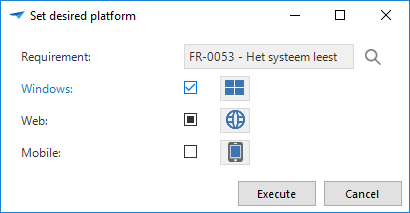 Set the desired platform for a functional requirement
Non-functional system requirements
Non-functional system requirements describe properties of the system such as the performance, security and maintainability. Reference can be made for this to the quality aspects of products defined by ISO 9126, such as Reliability, Usability and Efficiency.
What is needed for a requirement
Due to the critical positioning of requirements in the software development process, it is important that requirements satisfy a number of rules. Correct requirements satisfy the following rules:
Uniquely identifiable
A requirement is given a unique number or reference code. This code may not subsequently be changed. The code is used to be able to refer to this requirement. The structure of these references is determined in the requirements model.
Atomic
A functional requirement may not include more than one requirement or possibility. If the requirement can be split then this has to be done, therefore resulting in two requirements. IEEE states that several conditions or restrictions may be specified in a requirement.
Unambiguous
It should only be possible to interpret a requirement in one way. This is a rule for which the measurability is sometimes difficult to determine. The following rules of thumb can be considered:
- Do not use wording that leaves matters open;
- Do not use terms that have more than one meaning;
- Always describe who will carry out an action
It is also recommended to avoid negations. The system will not store any address details of a customer infinitely offers many possibilities for what will be stored in the system.
No implementation details
Requirements describe the problem or the need of the stakeholder and thereby the outside of the system (what goes in and what comes out). Requirements may therefore not describe any solutions.
Traceable
At companies with dynamic operations, it happens that the requirements change through the course of time. Amendments in legislation, dynamics of the market and wishes of users lead to additional requirements, requirements changing and other requirements becoming obsolete. For this reason, it is important that the requirements have a high level of traceability.
It has to be possible at any time to trace by whom, why and when a requirement is drawn up and changed. This is the backwards traceability of a requirement. A hierarchical classification of requirements also helps with backwards traceability. System requirements are linked to the user requirements that they support. User requirements are in their turn linked to the business requirements that describe the objective of the requirement.
When a requirement changes or becomes obsolete, it has to be possible to trace how the requirement is implemented in the current system. The impact of a change can be determined on the basis of this and a plan can be drawn up for the modification of the system. This is called forward traceability.
Testable / verifiable
The final test of the implemented system takes place on the basis of the requirements. If it is determined that all requirements are satisfied, the system is considered as completed. Each requirement must be measurable and limited to be able to determine if this is fulfilled or not.
With non-functional requirements particularly, it is important that the acceptance criteria are included because these requirements do not answer a what question, but are focused on performance and ease of use. For example, the non-functional requirement: The new application must be fast when executing the MRP run contains no acceptance criteria. The new application must execute the MRP run within 10 minutes does contain this.
Ambiguous expressions
Clarity and unambiguity are important when drawing up requirements. Indeed, every stakeholder must interpret the requirements in the same manner. It is therefore necessary to avoid the use of ambiguous expressions in the requirements. To help with this, these expressions can be put on a blacklist.
If ambiguous expressions are used when drawing up the requirements, these words will light up and it will be made clear at a glance that the use of these words is worthy of reconsideration.
Example
The system will perhaps ask the user for confirmation before the invoice is sent.
This contains an ambiguous expression: perhaps. When? For a certain amount? After 5 hours? If the user has been working at the company for less than a year?
Entering requirements
The requirements for the system to be developed can be entered under the requirements tab.
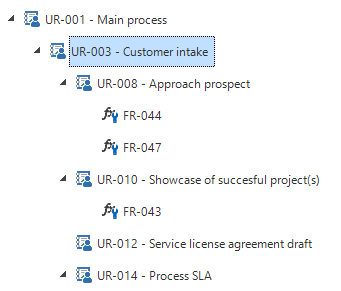 An example of the tree diagram with requirements
These are presented in a tree structure on the left of the screen. In this way, the requirements can be built up in a layered manner. The business requirements are at the highest level with possibly several levels of user requirements below them and at the lowest level the system requirements.
For each requirement, the requirements type is selected whereupon a number of fields appear that need to be completed.
- Requirement ID
A unique ID is assigned to each requirement. This ensures that the requirement is unique.
- Name
The name of the requirement, this is found again, among other things, in the tree structure. This only applies to the business and user requirements.
- Description
An exact description of what this requirement means.
- Type
Which type of requirement is it?
- Part of
Describes whether a requirement hangs under another requirement. The tree structure is built upon the basis of this.
- Sequence number
The sequence number is assigned automatically, though it can be changed here to change the position of the requirement in question in the tree structure.
- Status
This field is completed automatically. It is indicated here whether the requirement already existed and has been changed.
- Priority
The level of importance of the requirement and when it must be implemented.
- Analyst ID
Who has been assigned to develop the requirement. Only visible for functional requirements.
- Module
The module to which this requirement belongs. Only visible for functional requirements.
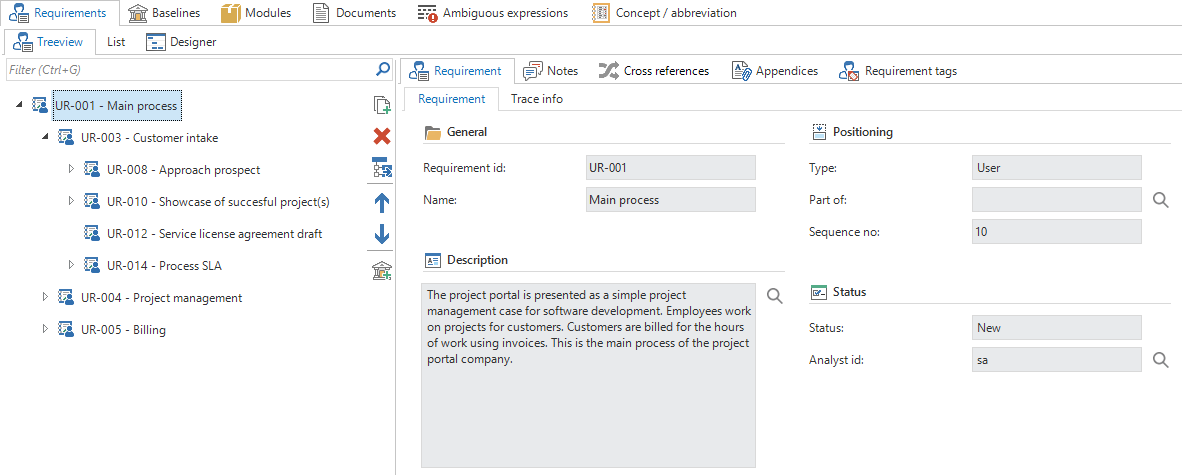 Creating a new requirement
Baselines
A baseline is an overview of the requirements at a certain moment. This can be created at any required moment on the process analysis screen by publishing all diagrams and starting the Create baseline  task.
task.
If all diagrams have not been published, then the following error message will be displayed.
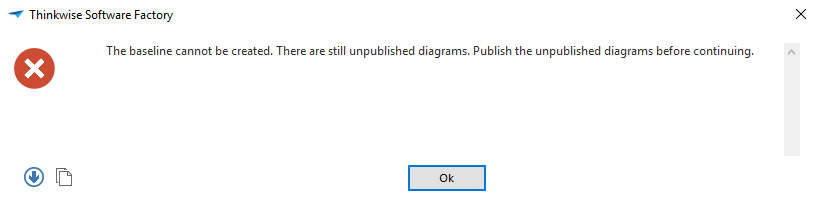 Error message when creating a baseline
By enabling the Diagrams to publish prefilter during the process analysis, only the still to be published diagrams are displayed. The Publish diagram task can be run for each process diagram.
Now that all diagrams are published, the Create baseline task can be started again.
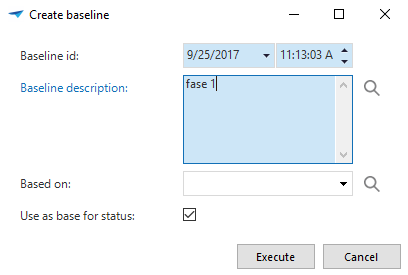 Create baseline
The baseline that is created provides an overview of the status of the requirements at a specific moment in time. The Requirements tab contains an overview of all the requirements with the time they were created.
Baselines are intended to map out a list of changes of the requirements when milestones are reached in a project. This includes, for instance:
- End of a certain phase
- An approval round of the stakeholders
- A steering committee consultation
- Etc.
Thus understanding how a baseline works, it makes sense that we have to approve all requirements first. To do this, the developer can activate the review mode. Not every requirement shows the state it is in. With the two tasks, it is possible to change the state to in approval or approved.
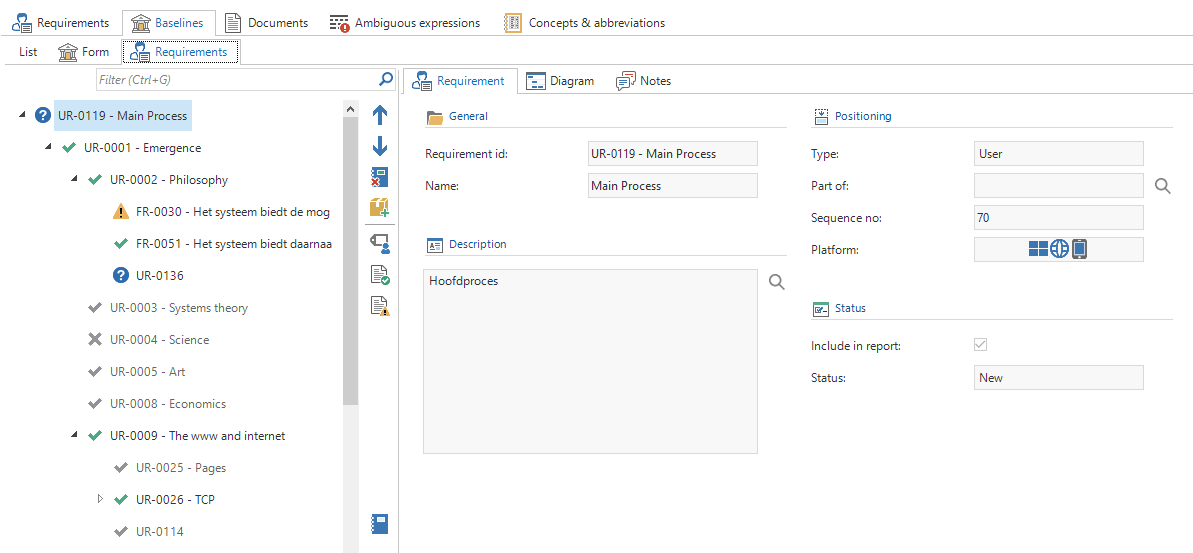 Requirements in review mode
Previous versions
It is possible to see the previous versions of a requirement. This overview uses the requirements history stored in the baselines.
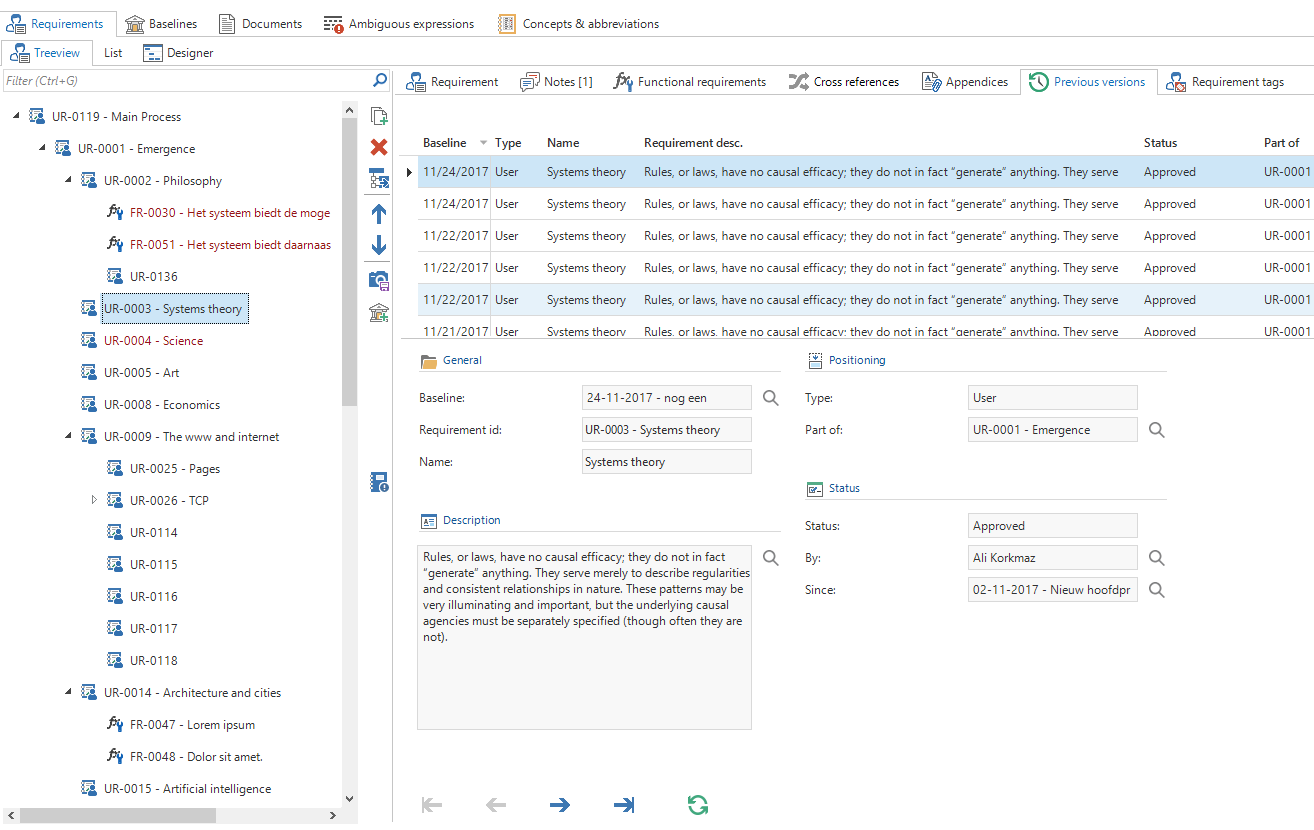 Previous version
Requirements report
When the requirements are defined, a report can be generated which presents an overview of the requirements. The generation of this report takes place from the Baseline tab. As a standard, it shows a concept report indicated by the word concept on top of the report. After creating the baseline, it becomes a final report. This is due to the fact that a baseline cannot be changed after it is generated, so the report is also fixed for that baseline.
In order to amend the report to the wishes of the user, parts of the process can be excluded from the report. A task is available for this. It is always possible to add the process back into the report. The task to exclude a process is changed to the Include in the report task. This is also available for appendices. On the tab appendices, it shows how many appendices are included in the report.
The report is then printed in a report viewer. A selection can be made to print this document or to save it as an Excel, PDF or Word document.
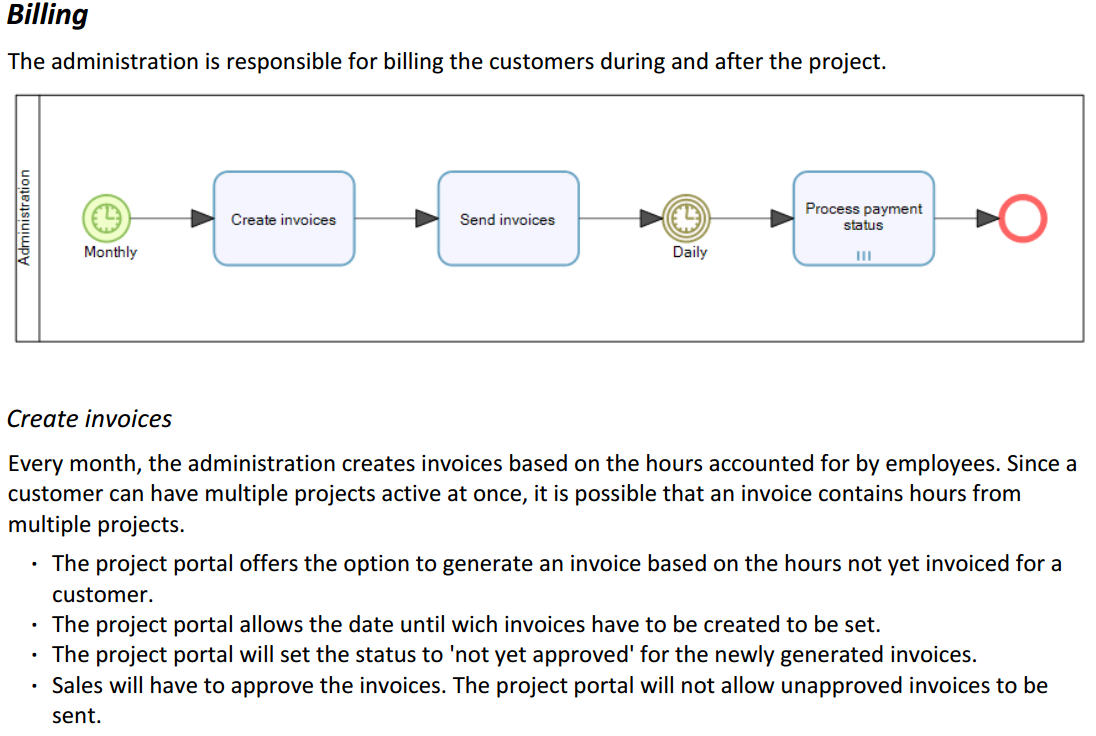 Example of a report