
Validation
Thinkwise provides a comprehensive set of validations with the Software factory. Validations are carried out on the model to check for errors. These errors are pre-defined and specified in a base project. Consider, for instance, a requirement that a primary key always has to be at the top in a table and that each table has to have a standard sort sequence. It is also possible to create your own, company or product-specific validations.
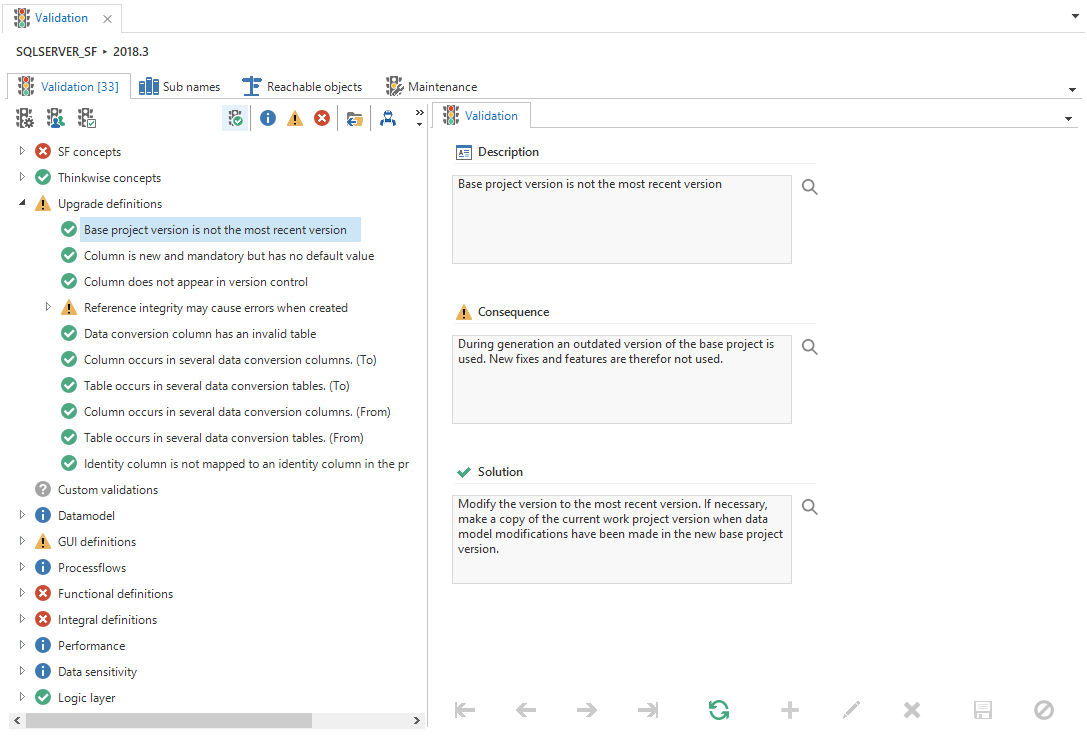 Validation screen
Every screen in the Software Factory has a Validations tab page where the validations that are specific for modeler can be executed. The Validation screen allows you to perform a full validation of your application before deployment.
Execute validations
Validations may be conducted at various levels by means of the following tasks:
- Execute all validations
- Execute validation group - executes all validations of the selected validation group
- Execute selected validation - executes the selected validation
- Approve validation message - approve a validation message so it will be hidden from the list of messages (allowed for information and warning messages only)
- Undo approval
Status
After execution, an icon indicates the status of each validation:
| Pictogram | Status | Description |
|---|---|---|
 | OK | No problems found |
 | Information | Informational, no action required |
 | Warning | Possible problem |
 | Error | Problem must be resolved |
 | Unknown | Validation not executed |
Filters
Prefilters are provided to filter the validation messages:
- Hide approved messages - hides approved messages, default on
- Information - only shows messages at the information level and higher
- Warning - only shows messages at the warning level and higher
- Error - only shows error messages
- New in this version - only shows validation messages that are new in this project version. For this filter to work, the previous project version must be validated.