
Requirements
The specification of Requirements in the Software Factory is based on two standards:
- IREB - the deviser for the international certification Certified Professional for Requirements Engineering (CPRE). It is the role of the IREB to draw up a universally accepted international qualification scheme, focused on Requirements Engineering for professionals, through the provision of core syllabi and through the establishment of guidelines for the accreditation and the research. The accreditation process and the certification are regulated by the IREB steering committee.
- IEEE 830 - states that the following objectives are achieved through the drawing up of requirements:
- Requirements serve as the basis for which an agreement can be reached between the customer and the software supplier about what the product has to do.
- Drawing up requirements reduces the effort that is involved in the development of the software because any uncertainties are identified at an early stage.
- On the basis of the requirements, an estimation can be made about the magnitude of the development process.
- The requirements offer a benchmark for validation and verification of the end product.
- Through the platform independent nature of requirements, these can be reused in other environments.
- Requirements serve as a basis for modifications to the system.
An analyst should always strive to keep the requirements independent of the implementation. However, when there are explicit demands regarding the implementation, these should be described or included as attachments as they become part of the basis for the agreement between business and IT.
Roles used in requirement analysis
The Specification analysis role can be used to manage all specifications in the Software Factory.
The Specification review role can be granted to stakeholders, allowing them read-only access to the specifications. Stakeholders can participate in discussions regarding requirements and can change the specification state and acceptance state of requirements.
The Specification review role can access the Software Factory via a Web GUI.
Requirement analysis
The first step in requirement analysis and specification is identification of the stakeholders. Key stakeholders can be granted access to the Software Factory in the role of Specification review.
Next step is elicitation. Via interaction with stakeholders, process analysis and exploration existing systems, the requirements will be identified.
Specifying the business process is a great way to help identify requirements. An analyst will try to determine if and how the system should support each activity in the business process. This will be a great way to prevent scope creep, as requirements that do not support the business process are often categorized as gold-plating.
When an existing system will be replaced, the feature tree will be a good way to traverse this system and find out what the requirements for each feature are. Existing data models can be cross-referenced to see if no features are missing. These two approaches are not mutually exclusive.
Every new requirement should introduce work. When the requirement changes, any work for which no development has been done can be updated accordingly. When work has already started or has already been completed, a new work item should be created to update the software accordingly.
After all work for a requirement has been completed, the stakeholders can verify this via an acceptance test. The results of these test can be registered in the discussion and the acceptance status can be updated accordingly. Both errors in the implementation or errors in the initial requirement specification can lead to new work.
Requirements in the Software Factory
In the Software Factory, the term requirements is only used for a subset of requirements that can be found in literature, namely system requirements. The system requirements answer the how-question. How will the system support a certain user activity? How will the system support a certain feature?
Other questions that can be answered corresponding to other types of requirements, such as why?, what? and when? are answered using the business process tree, the feature tree and the iteration tree.
System requirements can be split into two types: functional and non-functional requirements:
- Functional requirements describe actual functionality that the system provides. These should be the vast majority of the system requirements.
- Non-functional requirements are used to describe other aspects such as performance, ease-of-use. Non-functional requirements are difficult to test, try to set realistic and measurable targets in advance.
Target audience
Requirements should be readable by non-technical stakeholders, so refrain from using technical terms such as tables, columns and triggers. The requirements should answer how the system should support the user, not how a developer would implement this.
In some cases, the stakeholders can express strong opinions about how a developer should implement this. While it is discouraged to include implementation details in the requirements, if these are demands made by the business, these solutions become part of the requirements as they are part of the agreement between business and IT. Attachments can be used to upload state flow diagrams, entity relationship diagrams, wireframes or mock-ups that convey the desired solution.
A formal example of a requirement can be: The system must allow customers to change their invoicing address. This form of self-service reduces workload for the service department. The requirement contains the functionality, the role that can use the functionality and the rationale for the requirement.
However, an analyist is free to use a specification method of their own liking. User stories such as As a customer, I want to be able to change my own invoicing address so I don't have to call the service department would convey the desired functionality just as well.
Roles
The Specification analysis role can be used to manage all specifications in the Software Factory.
The Specification review role can be granted to stakeholders, allowing them read-only access to the specifications. Stakeholders can participate in discussions regarding requirements and can change the specification state and acceptance state of requirements.
The Specification review role can access the Software Factory via a Web GUI.
Forbidden words
Clarity and unambiguity are important when drawing up requirements. All stakeholders should interpret the requirements in the same manner. To avoid the use of vague or technical words, a list of forbidden words can be registered. These words will light up in the requirements description.
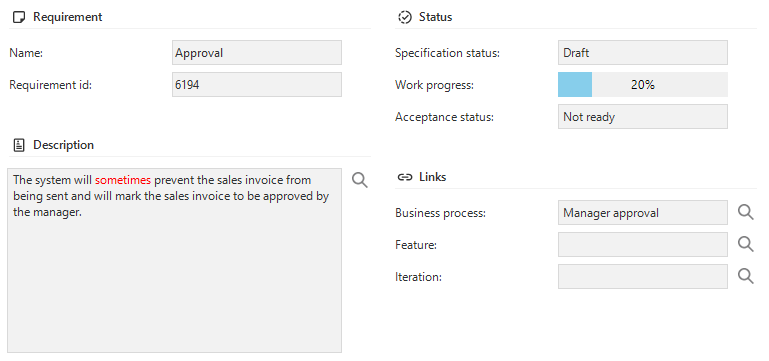 An example of a forbidden word being used in a requirement
The list of forbidden words can be accessed from the Advanced menu under Master data - Specification.
Requirement status
Requirements have two types of statuses, one for the requirement itself, the Specification status, and one for the acceptance of the implementation by stakeholders, the Acceptance status.
The values for specification status and acceptance status can be changed in the Advanced menu under Master data - Specification. An order number can be specified which decides the ordering of the various statuses in the combobox when changing the status.
Additionally, a Progress value can be defined for each status. This value will be used when determining the average progress of all requirements linked to a business process, feature or iteration. Requirements having a specification status or acceptance status with no progress value will be excluded from the calculation of the average specification progress or acceptance progress, respectively.
A default specification status and a default acceptance status are required. These can be set using the corresponding tasks.
Discussion
The discussion tab page can be used to leave comments regarding requirements.
Linked work
The Linked work detail show the work that is directly linked to this requirement. Linked work will be linked to the same business process, feature and iteration as the requirement.
When work is linked to a requirement, changing the business process, feature or iteration of the requirement will also update the work.
A work item can be explicitly assigned to a different business process, feature or iteration than the requirement. This exception will remain intact even when the requirement is moved to a different business process, feature or iteration. When a work item has a different assignment, the value will be highlighted. Tasks are available to restore the business process, feature or iteration of the work item to match the requirement.
Log
All changes done to the requirement and the requirement attachments will be logged.